
Almost every WordPress form plugin calls itself free. Then you install it and find out that saving entries, conditional logic or file uploads are locked behind an upgrade, or that the “free” payment form takes a cut of every sale.
So we checked what eight popular contact form plugins actually give you without paying, and what each one costs when you outgrow the free version. Below you’ll find a side-by-side comparison, our pick for each kind of site, and the pros and cons of every plugin.
Full disclosure: we make Custom Contact Forms, one of the plugins on this list. We’ve kept the comparison factual, including where other plugins do better than ours.
Table of Contents
How we compared them
We picked eight of the most widely used form plugins on WordPress.org, plus our own. For each one, we went through its WordPress.org page, official documentation and pricing page in October 2026, and recorded:
- Saved entries: does the free version keep a copy of every submission in your dashboard?
- Conditional logic: can you show or hide questions based on earlier answers?
- File uploads and signatures: two features that are often the first to be locked.
- Payments: can the free version take payments, and does it add its own fee?
- Upgrade cost: the regular yearly price of the cheapest paid plan, and how many sites it covers.
We didn’t score design or speed, because those depend on your theme and hosting more than the plugin. Site counts are WordPress.org active installs.
Free WordPress contact form plugins compared
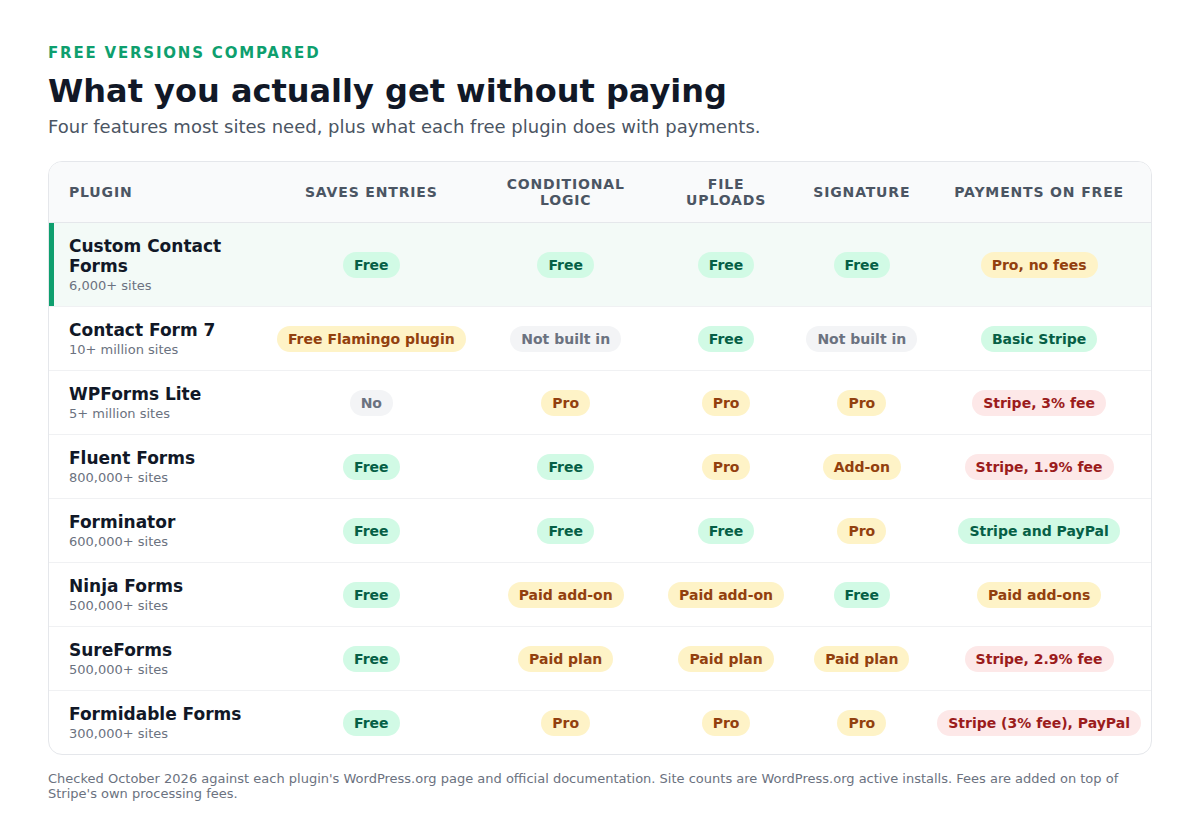
A few things stand out. Two of the most installed plugins, Contact Form 7 and WPForms Lite, don’t save your entries in the free version. And four plugins add their own fee on top of Stripe’s when you take payments for free, from 1.9% to 3%.
Quick picks
- Best for the essentials, all free: Custom Contact Forms
- Best for simple forms with a huge community: Contact Form 7
- Best for templates and a beginner-friendly builder: WPForms Lite
- Best for exporting your data: Fluent Forms
- Best for taking payments for free: Forminator
- Best for a free signature field and buying only the add-ons you need: Ninja Forms
- Best for building forms in the block editor: SureForms
- Best for spam protection out of the box: Formidable Forms
The 8 best free WordPress contact form plugins
1. Custom Contact Forms: best for the essentials, all free
Custom Contact Forms is the plugin we make, with 6,000+ active installs. It’s the only one on this list that includes all four core features in the free version: saved entries, conditional logic, file uploads and a signature field. It also brings Mailchimp signup forms, webhooks to Zapier, Make or n8n, and importers for Contact Form 7 and WPForms.
- Every entry saved, with CSV export
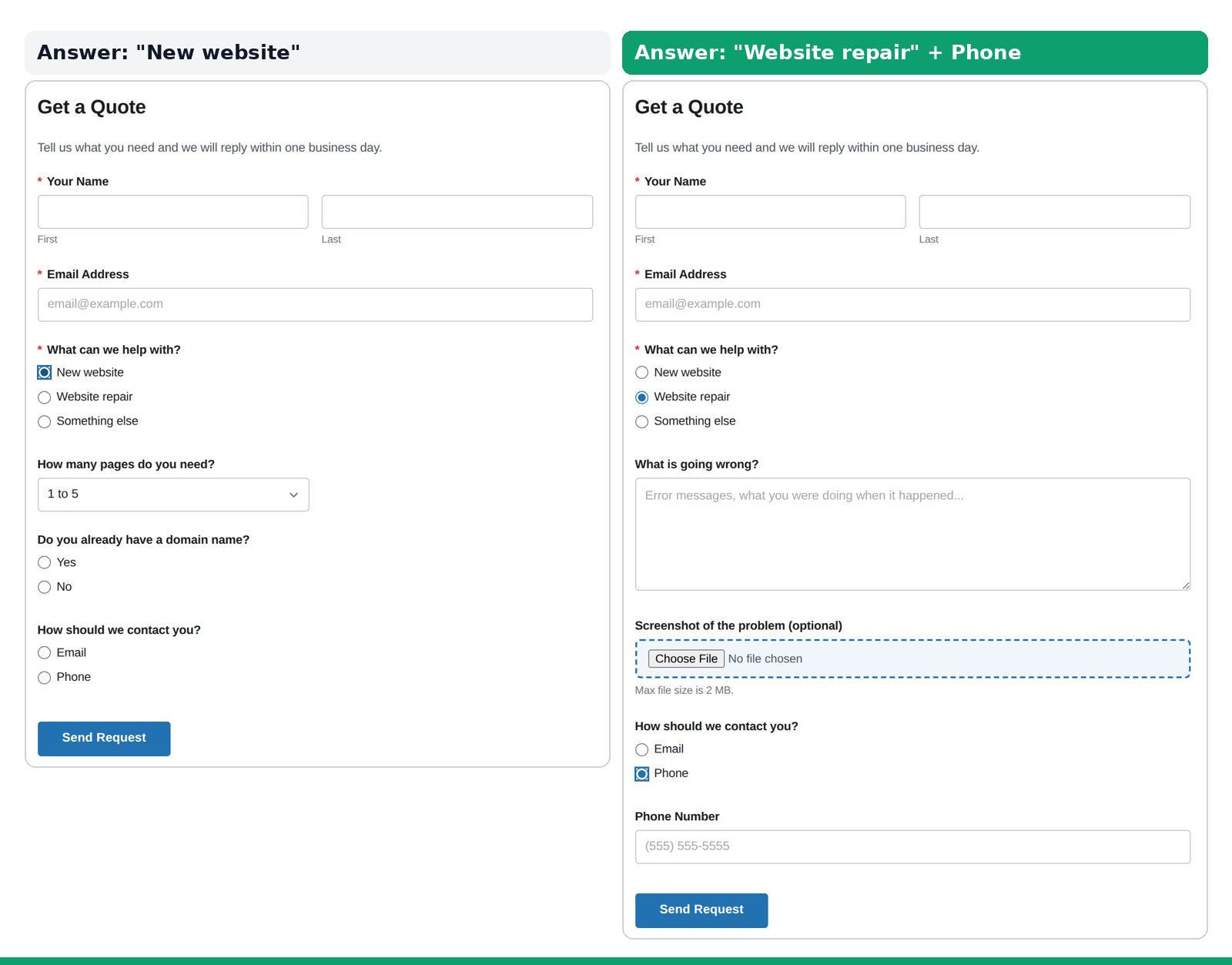
- Conditional logic for fields and whole sections
- File uploads saved to your Media Library
- Drawn signature field
- Turnstile, hCaptcha, reCAPTCHA, honeypot, and Akismet with a spam folder
- Imports Contact Form 7 and WPForms forms
- No payments in the free version
- Smaller community, so fewer third-party tutorials
Upgrading: Custom Contact Forms Pro is $80/year for unlimited sites you own, and adds Stripe and PayPal payments with no transaction fees, multi-step forms and PDF downloads.
2. Contact Form 7: best for simple forms with a huge community
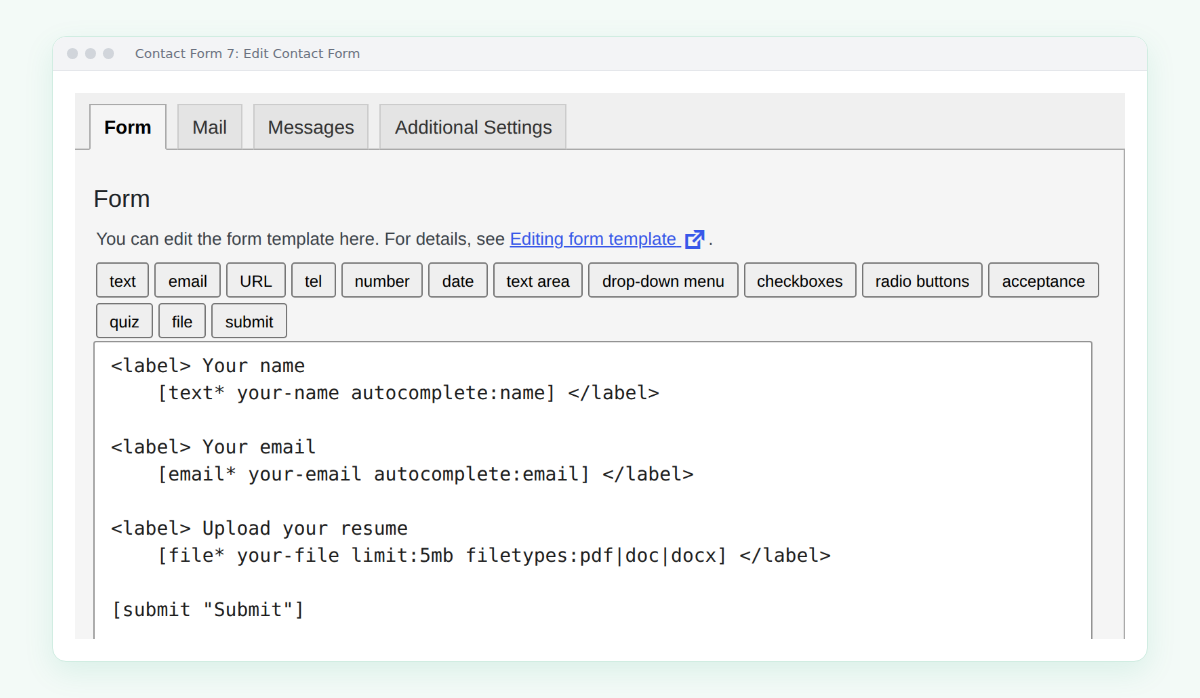
Contact Form 7 is the most installed form plugin on WordPress.org, with 10+ million active installs, and it’s completely free. Instead of a drag-and-drop builder, you write forms with short form-tags, which is flexible once you learn it. Because it’s so widely used, there are add-ons and answers for almost anything.
- Completely free, with no paid version
- File uploads and a basic Stripe integration
- reCAPTCHA, Cloudflare Turnstile and Akismet support
- Huge community and lots of add-ons
- Doesn’t save submissions without the separate Flamingo plugin
- No conditional logic or signature field without another plugin
- Uploaded files are deleted after they’re emailed, and PDFs are rejected by default (how to fix it)
- The current version requires PHP 8.3 or higher
Upgrading: there’s no paid version. Extra features come from add-ons by other developers, each with its own price.
3. WPForms Lite: best for templates and a beginner-friendly builder
WPForms Lite has 5+ million active installs and a polished drag-and-drop builder. Its WordPress.org page lists 2,100+ pre-built form templates, so you rarely start from a blank form.
- Easy drag-and-drop builder
- Thousands of templates
- Built-in spam protection
- Stripe payments in the free version
- Doesn’t store entries in your dashboard
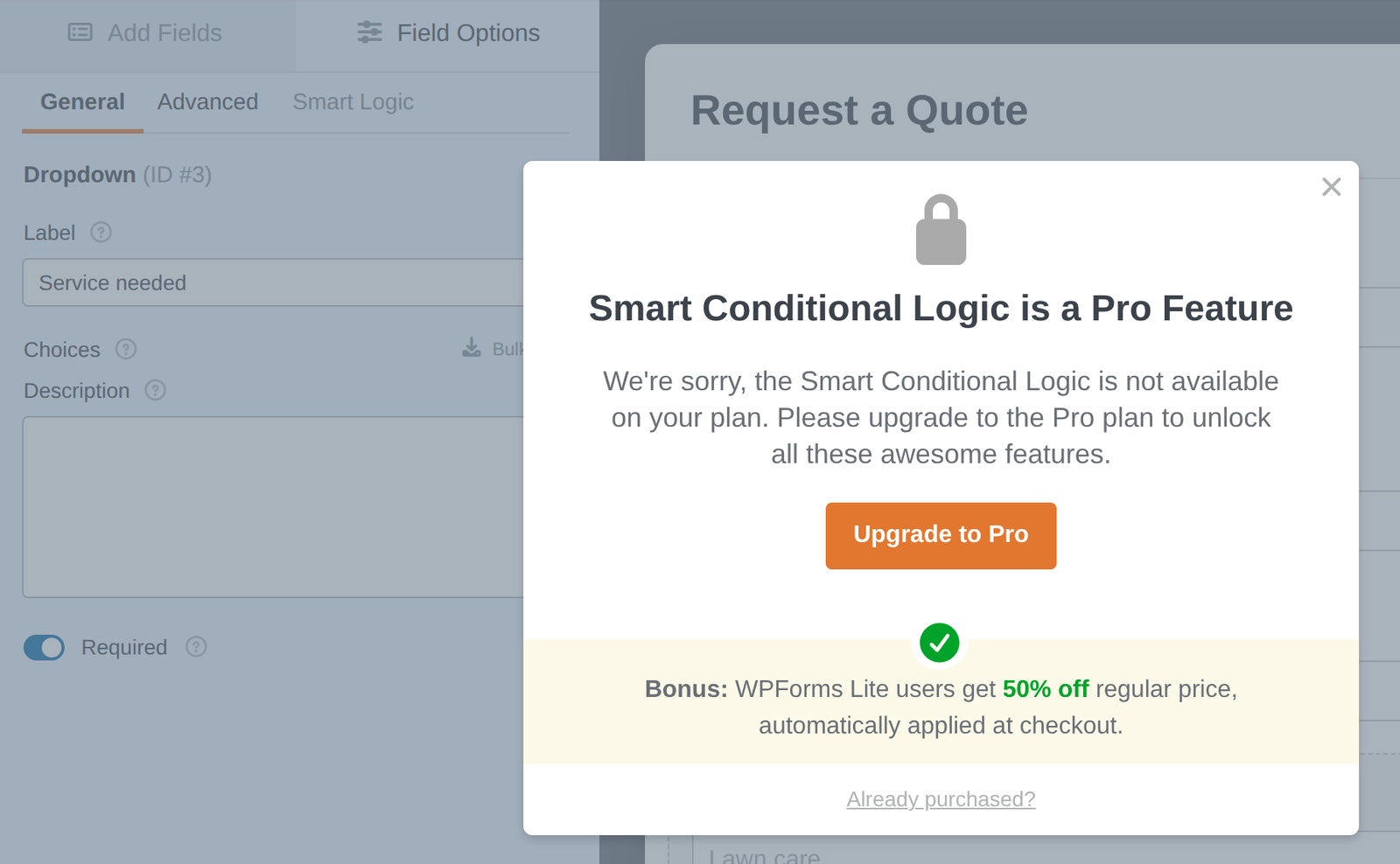
- Conditional logic, file uploads and signatures need a paid license
- 3% fee on payments, on top of Stripe’s
Upgrading: the Basic plan is $99/year for 1 site. If Lite’s limits are a problem, see our WPForms Lite alternative guide.
4. Fluent Forms: best for exporting your data
Fluent Forms has 800,000+ active installs and a generous free version, especially for working with your entries.
- Saved entries and free conditional logic
- Export to CSV, Excel, ODS or JSON
- reCAPTCHA, hCaptcha and Turnstile
- Mailchimp, MailPoet and FluentCRM integrations
- File uploads and multi-step forms are Pro
- Signature field is a separate add-on
- 1.9% fee on Stripe payments in the free version
Upgrading: the Single Site license is $79/year for 1 site, and there’s a lifetime option.
5. Forminator: best for taking payments for free
Forminator has 600,000+ active installs and gives away more than most. If you need to take payments and don’t want to pay for anything, this is the one to look at. Its WordPress.org page says Stripe and PayPal need “No Pro upgrade”.
- Saved submissions, conditional logic and file uploads, all free
- Stripe and PayPal payments in the free version
- Quizzes and polls included
- reCAPTCHA, hCaptcha and Turnstile
- E-signature field is Pro
- Recurring Stripe payments are Pro
- More to learn if you only need a contact form
Upgrading: Pro Basic is $60/year for 1 site.
6. Ninja Forms: best for a free signature field and buying only what you need
Ninja Forms has 500,000+ active installs. The free plugin covers the basics well, and extra features are sold as individual add-ons or as part of a membership.
- Every submission saved, with CSV export
- Free signature field, typed or drawn
- Honeypot on every form, plus reCAPTCHA, hCaptcha and Turnstile
- 31 form fields in the free plugin
- Conditional logic is a paid add-on
- File uploads and multi-step forms are paid add-ons
- Payments and email marketing are paid add-ons
Upgrading: the Plus membership is $99/year for 3 sites and includes conditional logic and file uploads.
7. SureForms: best for building forms in the block editor
SureForms has 500,000+ active installs and builds forms with the WordPress block editor instead of a separate builder, which feels natural if you already use blocks.
- Saved entries
- AI form generation, with no API key needed
- Stripe payments in the free version
- reCAPTCHA, hCaptcha, Turnstile and a honeypot
- Conditional logic, file uploads and signatures need a paid plan
- Multi-step forms, PayPal, integrations and webhooks need a paid plan
- 2.9% fee on Stripe payments on the free plan
Upgrading: the Team plan is $149/year for 5 sites.
8. Formidable Forms: best for spam protection out of the box
Formidable Forms has 300,000+ active installs and a large set of paid features. The free version is a solid starting point, with unlimited forms.
- Saved entries with CSV export
- Honeypot, Akismet, reCAPTCHA, hCaptcha and Turnstile
- Stripe and PayPal payment forms
- Unlimited forms
- Conditional logic, file uploads and signatures are Pro
- Multi-page forms are Pro
- 3% fee on Stripe payments in the free version
Upgrading: the Basic plan is $79/year for 1 site, but the 3% Stripe fee stays until the Business plan ($399/year).
What upgrading costs
Free is a good start, but many sites outgrow it. Here’s the regular yearly price of the cheapest plan that unlocks each plugin’s paid features. Many of these plugins offer a discount on the first year, then renew at the regular price.
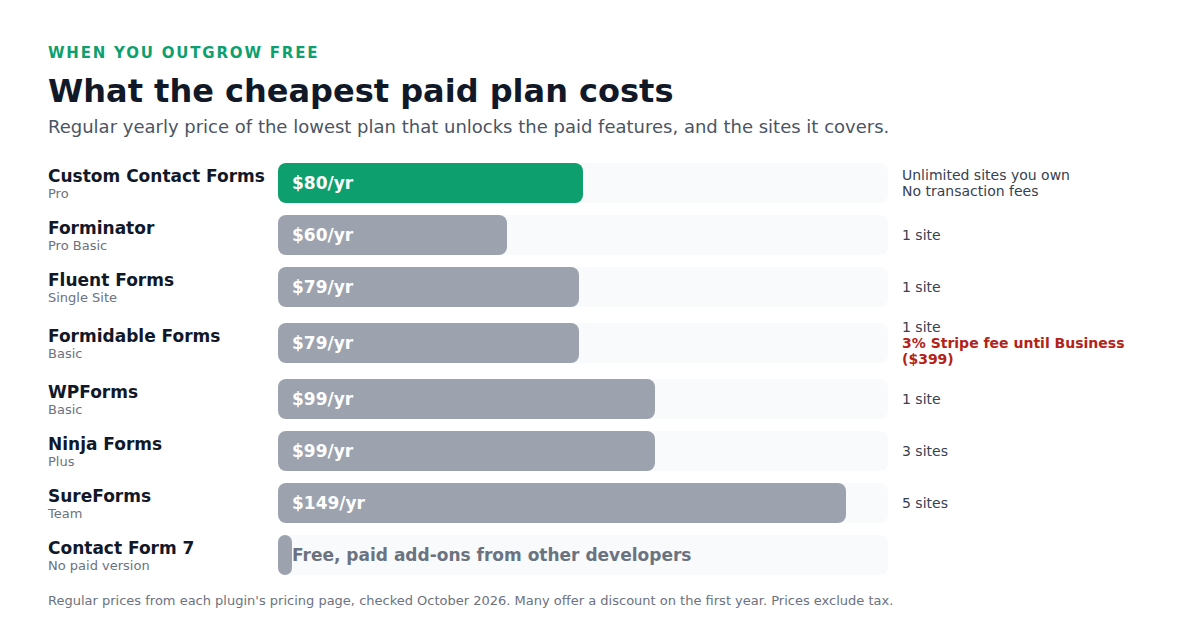
Two things to compare besides the price: how many sites the plan covers, and whether you still pay a fee on payments. Most entry plans cover a single site.
How to choose a free contact form plugin
Start with what you can’t do without:
- Do you need a copy of every message? Pick a plugin that saves entries. Emails go missing more often than you’d think, as we explain in contact form not sending email.
- Will different visitors need different questions? You need conditional logic. Custom Contact Forms, Fluent Forms and Forminator include it free.
- Do people need to send files or sign? Check file uploads and the signature field, which are often the first things locked.
- Will you take payments? Look at the fee. A 3% fee on $20,000 a year in sales is $600, every year.
- Do you run more than one site? Check how many sites the paid plan covers before you commit.
Switching from Contact Form 7 or WPForms
If you’re on Contact Form 7 or WPForms Lite and want saved entries, conditional logic and uploads for free, you don’t have to rebuild your forms. Install Custom Contact Forms, go to Forms → Import, and bring your existing forms across, including their fields and notification emails.
Frequently asked questions
What is the best free contact form plugin for WordPress?
It depends on what you need. For saved entries, conditional logic, file uploads and a signature field all free, Custom Contact Forms. For free payments, Forminator. For a simple form with the biggest community, Contact Form 7.
Which free form plugins save entries?
Of the eight we compared, all except Contact Form 7 (without the Flamingo plugin) and WPForms Lite save entries in the free version.
Do free form plugins charge transaction fees?
Some do. In our comparison, WPForms Lite and Formidable Forms add 3% to Stripe payments, SureForms adds 2.9%, and Fluent Forms adds 1.9%, all on top of Stripe’s own fees.
Which free form plugin has conditional logic?
Custom Contact Forms, Fluent Forms and Forminator include conditional logic free. In the other five, it needs a paid version, a paid add-on or another plugin.
Is Contact Form 7 still free?
Yes. Contact Form 7 has no paid version. Some features, like saving submissions or conditional logic, need separate plugins.
Which free form plugin is easiest for beginners?
Plugins with a drag-and-drop builder, like WPForms Lite, Custom Contact Forms, Fluent Forms and Forminator, are easier to start with than Contact Form 7, which uses form-tags.
Can I use a free form plugin on a business website?
Yes. All eight are free to use on business sites. Just check that the free version saves entries, so you don’t lose leads if an email goes missing.
Get the essentials free. Download Custom Contact Forms from WordPress.org for saved entries, conditional logic, file uploads and signatures, with no upgrade needed.
Free on WordPress.org
Never lose another form entry
Custom Contact Forms saves every entry on your site and includes conditional logic, file uploads, a signature field, Mailchimp, webhooks and spam protection, all free.
Get our new form guides by email
Practical guides on forms, email delivery and spam, plus news when Custom Contact Forms gets new features.
We only use your email to send our guides and news. Unsubscribe anytime. Privacy Policy
