
Every WordPress site with a contact form gets spam eventually. It starts with a few junk messages a week, then one day your inbox is full of fake enquiries, crypto offers and links you’d never click. The fix is spam protection, but there are four big names to choose from, and each one works differently.
In this guide to WordPress form spam protection, we compare Google reCAPTCHA, Cloudflare Turnstile, hCaptcha and Akismet: what each one costs, what your visitors see, and which to use for which kind of site. We checked every price and limit against each provider’s own pages in October 2026.
Table of Contents
WordPress form spam protection compared
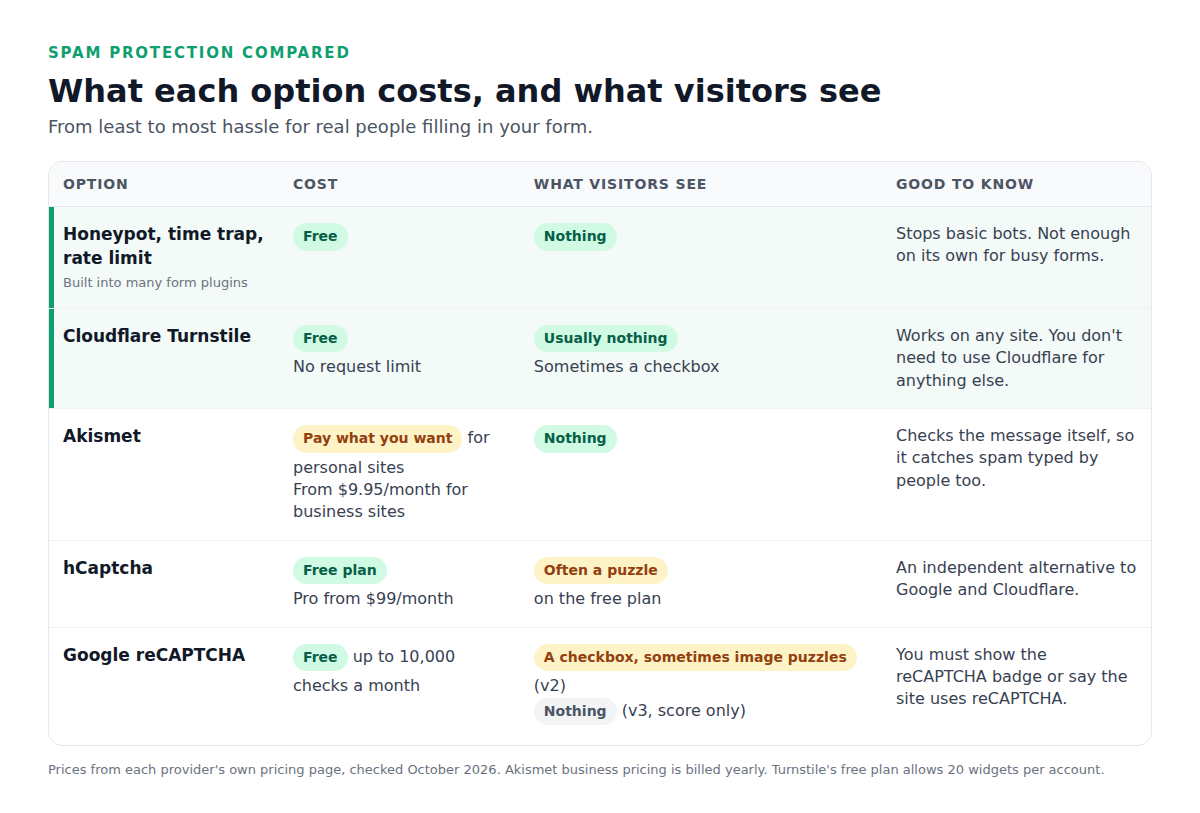
The big difference is what real people have to do. Every puzzle you show costs you some genuine messages, because some people give up. The best protection stops bots without asking humans for anything.
Start with the free layer: honeypot, time trap and rate limit
Before adding any service, check what your form plugin already does. Many include invisible checks that stop simple bots:
- Honeypot: a hidden field people never see. Bots fill in every field, so anything that fills it in is rejected.
- Time trap: rejects forms submitted faster than a human could type, such as within 3 seconds of the page loading.
- Rate limit: stops one visitor sending dozens of messages in a few minutes.
These cost nothing and never bother visitors. On a quiet site they may be all you need. Smarter bots get past them, though, which is where the four services come in.
The four spam protection services
Cloudflare Turnstile: best for most sites
Turnstile is Cloudflare’s free alternative to CAPTCHAs. It checks visitors in the background, and most people never see anything. When it’s unsure, it shows a simple checkbox instead of an image puzzle.
- Cost: free, with no limit on the number of checks. The free plan allows 20 widgets per account.
- Works on any site. You don’t need to use Cloudflare for your hosting or domain.
- Privacy: Cloudflare says Turnstile only processes the data it needs for the check, and doesn’t read what people type into your form.
Akismet: best for spam typed by real people
Akismet works differently from the other three. Instead of testing the visitor, it checks the message after it’s sent, using what it has learned from the spam it sees across the many sites that use it. Visitors see nothing at all, and it catches spam that humans type by hand, which CAPTCHAs can’t.
- Cost: pay what you want for personal sites and blogs. Business sites need a paid plan, from $9.95 a month billed yearly.
- Needs the Akismet plugin installed and connected, and a form plugin that supports it.
- Watch out for false positives. Akismet occasionally flags a real message, so your form plugin should keep flagged messages somewhere you can check, not delete them.
hCaptcha: best if you want an independent option
hCaptcha is a CAPTCHA service from an independent company, and an option for sites that prefer not to use Google or Cloudflare.
- Cost: there’s a free plan. Its paid Pro plan starts at $99 a month billed yearly.
- What visitors see: on the free plan, hCaptcha says most visitors will see a challenge, usually an image puzzle. That’s the main downside for a contact form.
Google reCAPTCHA: familiar, but with limits
reCAPTCHA is the one most people recognize. It comes in two main versions: v2 shows the “I’m not a robot” checkbox and sometimes image puzzles, while v3 runs invisibly and gives each visitor a score.
- Cost: free for up to 10,000 checks a month. Above that you need to turn on Google Cloud billing.
- Disclosure: Google requires either the reCAPTCHA badge on your pages or a line saying “This site is protected by reCAPTCHA.”
- Privacy: it’s a Google service, so mention it in your privacy policy, especially if you have visitors in Europe.
Which one should you use?
- Most sites: the built-in honeypot plus Cloudflare Turnstile. Free, and almost no one notices it.
- Forms that get hammered: Turnstile plus Akismet. Turnstile stops the bots, Akismet catches what people type by hand.
- You’d rather avoid Google and Cloudflare: hCaptcha, accepting that more visitors will see a puzzle.
- You already use Google services everywhere: reCAPTCHA is fine on a site with fewer than 10,000 form checks a month.
Pick one CAPTCHA, not two. Stacking Turnstile and reCAPTCHA on the same form doesn’t stop more spam, it just slows down real people. Akismet is the exception, because it works on the message, not the visitor.
Getting spam in Contact Form 7?
Contact Form 7 has its own spam options. Here’s what it supports in the current version, 6.2:
- Cloudflare Turnstile and reCAPTCHA v3 are built in. Add your keys under Contact → Integration.
- Akismet works when the Akismet plugin is active, but only after you add options like
akismet:author_emailto your form-tags, so it knows which fields to check. - Disallowed words: Contact Form 7 uses the “Disallowed Comment Keys” list under Settings → Discussion.
- hCaptcha isn’t built in. It needs a separate plugin.
One thing to know: Contact Form 7 doesn’t save messages, so when spam protection blocks a real message by mistake, there’s no copy to recover. We cover that in Contact Form 7 doesn’t save submissions.
How to set up spam protection in Custom Contact Forms
Custom Contact Forms includes all four services free, plus the invisible checks, so you can use the setup recommended above without extra plugins. To see how its other free features compare, read our roundup of the best free WordPress contact form plugins.
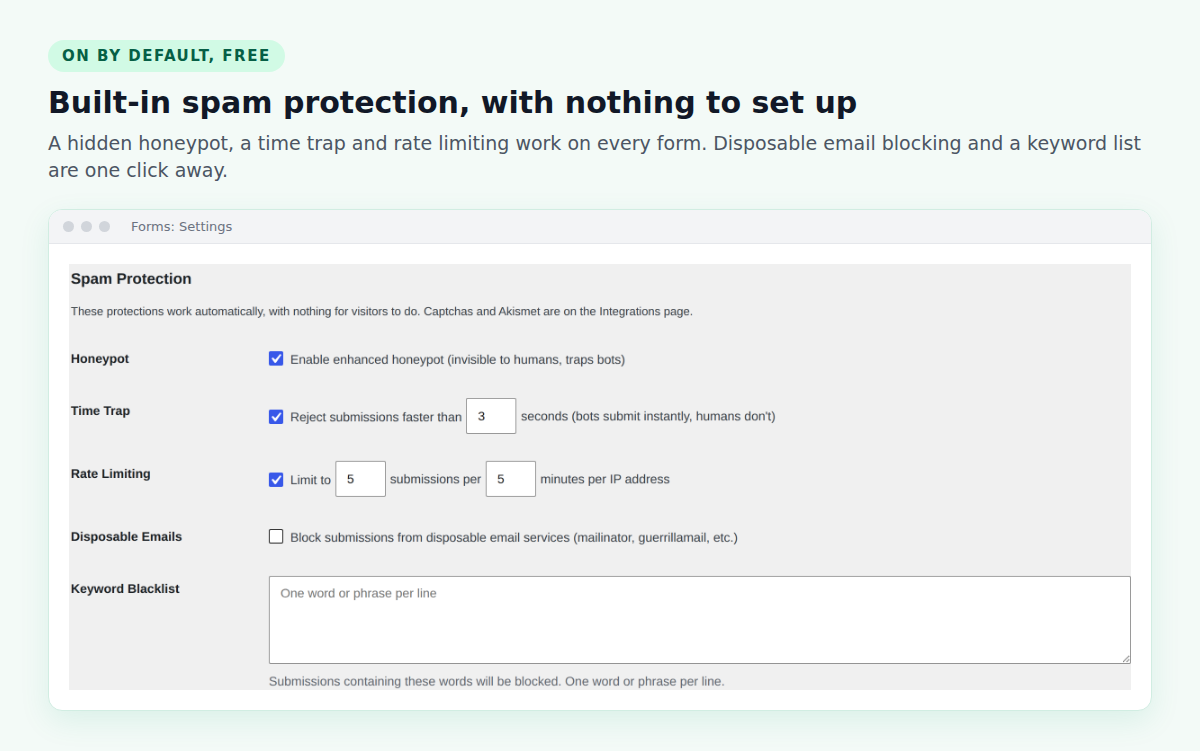
1. The built-in checks are already on
Every form has a hidden honeypot, a time trap and rate limiting from the moment you install the plugin. Under Forms → Settings you can also block disposable email addresses and add a list of words that mark a message as spam.
2. Turn on Turnstile (or hCaptcha)
Go to Forms → Integrations and click Spam protection to see all four options.
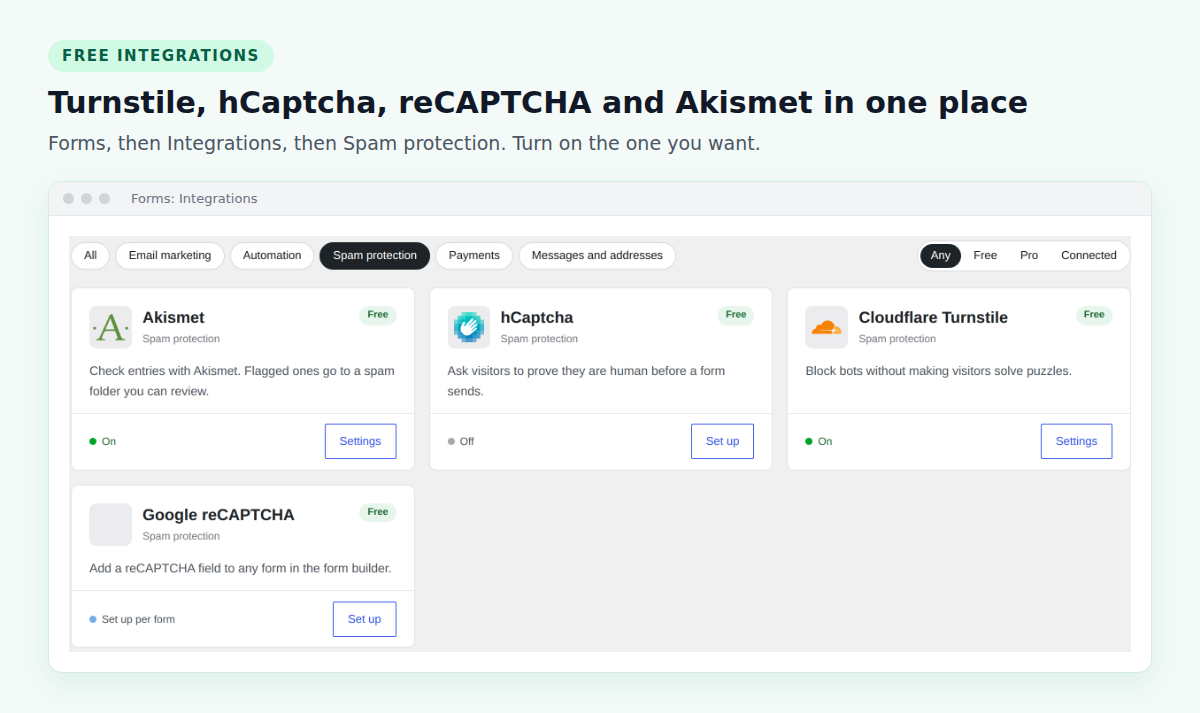
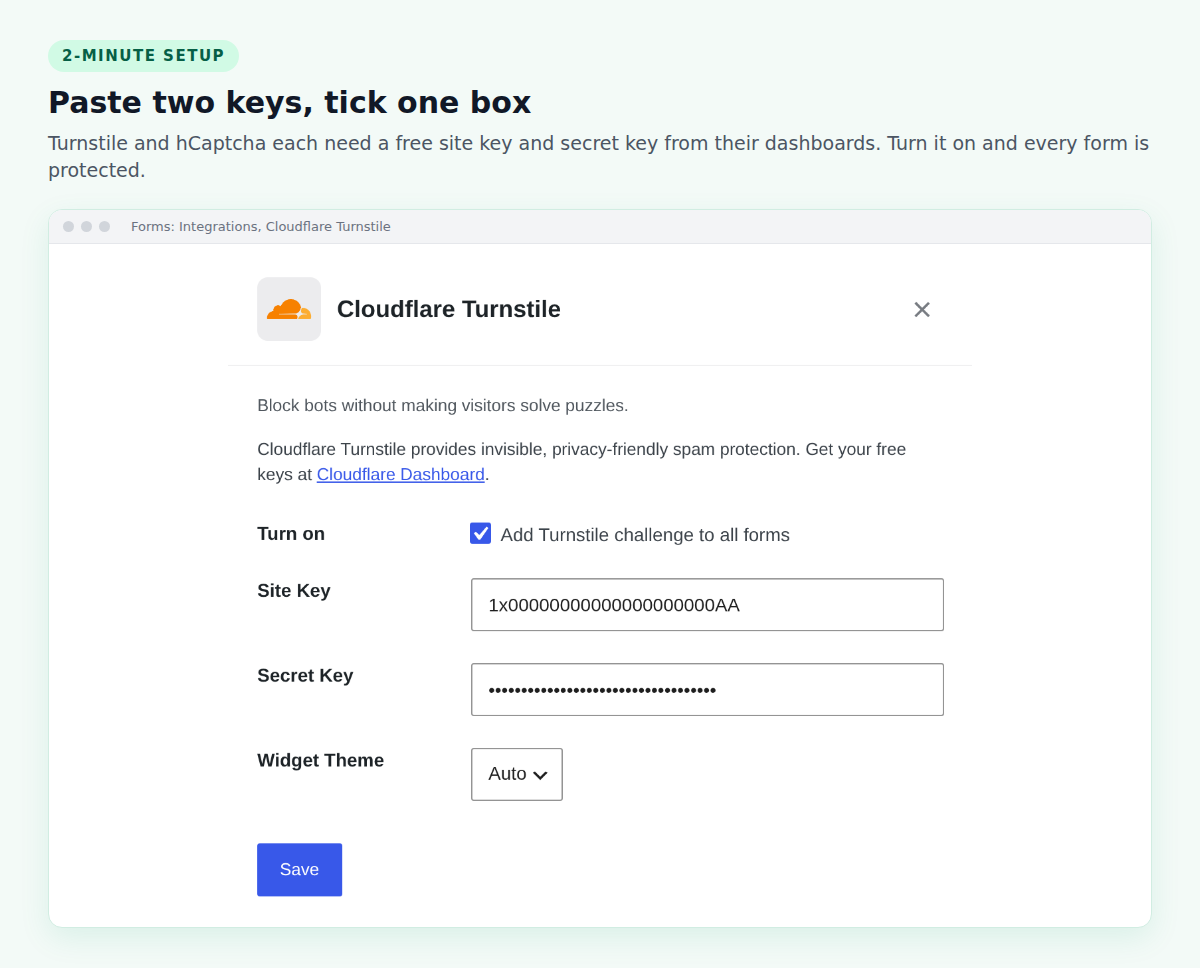
Click Settings on Cloudflare Turnstile, paste the site key and secret key from your free Cloudflare dashboard, tick Add Turnstile challenge to all forms and save. hCaptcha works the same way. If a visitor fails the check, the widget resets and asks them to try again.
Prefer reCAPTCHA? Add a reCAPTCHA field to individual forms in the form builder instead.
3. Add Akismet for stubborn spam
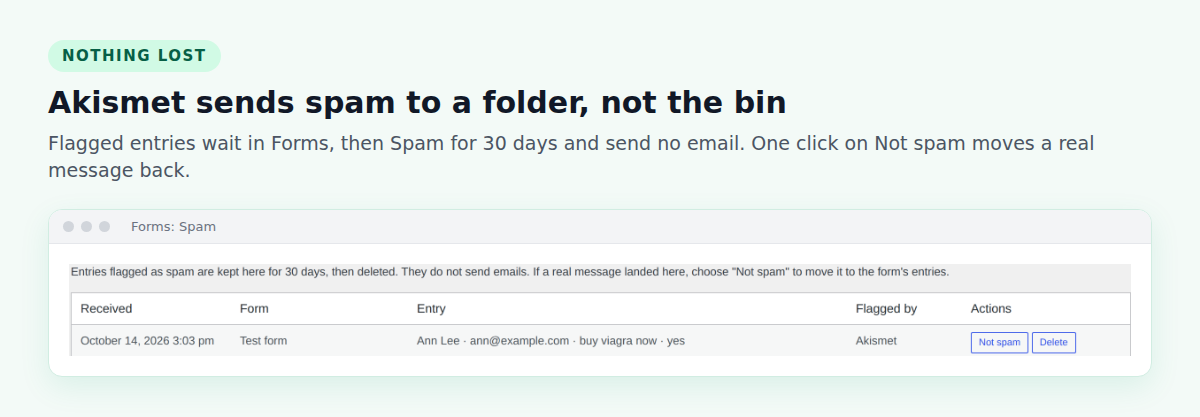
With the Akismet plugin set up on your site, turn on Akismet in Forms → Integrations. There are no form-tags to edit: Custom Contact Forms sends the right fields automatically. Flagged messages go to Forms → Spam instead of your inbox, so a real message caught by mistake is never lost. Click Not spam to move it back, which also teaches Akismet. Spam is deleted automatically after 30 days.
Because every message is also saved in WordPress, nothing depends on email getting through. That matters when you’re tuning spam filters, as we explain in contact form not sending email.
Frequently asked questions
What is the best spam protection for WordPress forms?
For most sites, a built-in honeypot plus Cloudflare Turnstile. Both are free and barely noticeable to visitors. Add Akismet if spam still gets through.
Is Cloudflare Turnstile better than reCAPTCHA?
For a contact form, usually yes. Turnstile is free with no check limit and rarely shows visitors anything. reCAPTCHA is free only up to 10,000 checks a month, and v2 can show image puzzles.
Is Akismet free?
For personal sites and blogs, Akismet lets you pay what you want. Business sites need a paid plan, starting at $9.95 a month billed yearly.
Do I need a CAPTCHA if I use Akismet?
Not always, but they work well together. A CAPTCHA like Turnstile stops bots before they submit, and Akismet checks the messages that get through.
Why am I still getting spam with reCAPTCHA?
Some spam is typed by real people, or sent by bots that pass the check. A CAPTCHA can’t stop those. Akismet, which checks the message itself, catches much of what CAPTCHAs miss.
Stop form spam for free. Download Custom Contact Forms from WordPress.org for a built-in honeypot plus free Turnstile, hCaptcha, reCAPTCHA and Akismet, with a spam folder so real messages are never lost.
Free on WordPress.org
Never lose another form entry
Custom Contact Forms saves every entry on your site and includes conditional logic, file uploads, a signature field, Mailchimp, webhooks and spam protection, all free.
Get our new form guides by email
Practical guides on forms, email delivery and spam, plus news when Custom Contact Forms gets new features.
We only use your email to send our guides and news. Unsubscribe anytime. Privacy Policy
