
Contact Form 7 has been the default WordPress form plugin for years. It’s free, it’s everywhere, and for a simple contact form it does the job. But many site owners reach a point where it stops being enough: messages that never get saved, uploaded files that disappear, no way to show a question only when it’s needed, and now a version that won’t run on older PHP.
If you’re looking for a Contact Form 7 alternative, this guide compares it with Custom Contact Forms, the free form plugin we make. We’ll be honest about when Contact Form 7 is still the right choice, and show you how to switch without rebuilding your forms.
Table of Contents
Why people look for a Contact Form 7 alternative
These are the problems we see raised again and again in the Contact Form 7 support forum:
- It doesn’t save messages. Contact Form 7 only sends an email. If the email fails or lands in spam, the message is gone, unless you add the separate Flamingo plugin. See Contact Form 7 doesn’t save submissions.
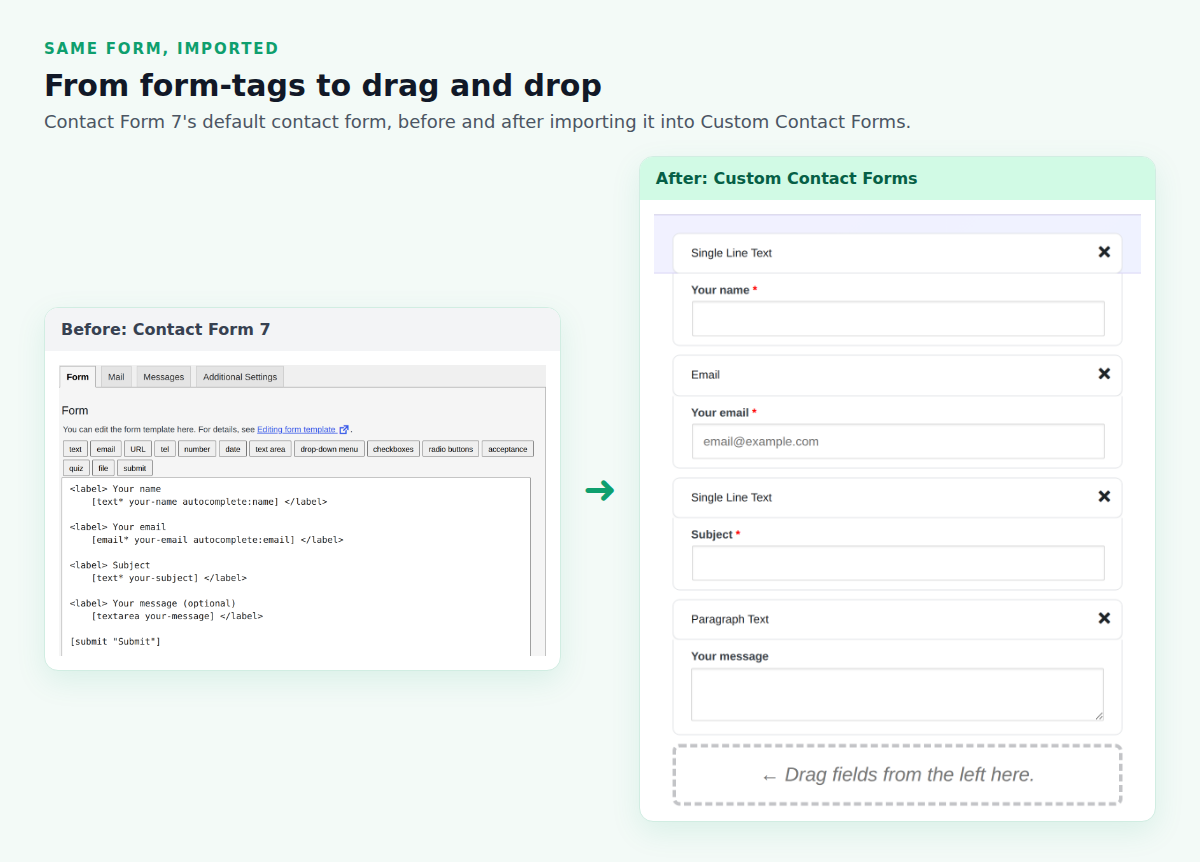
- Forms are written in form-tags. Instead of dragging fields into place, you type tags like
[email* your-email]. Flexible, but not friendly if you just want a form. - No conditional logic or signature field. Both need extra plugins.
- Uploaded files are deleted after the email is sent, and the default settings reject PDF and Word files. See Contact Form 7 file upload not working.
- The current version needs PHP 8.3 or higher. Many hosts are still on older PHP, which left sites unable to update or broken after updating. See Contact Form 7 and PHP 8.3.
Contact Form 7 vs Custom Contact Forms
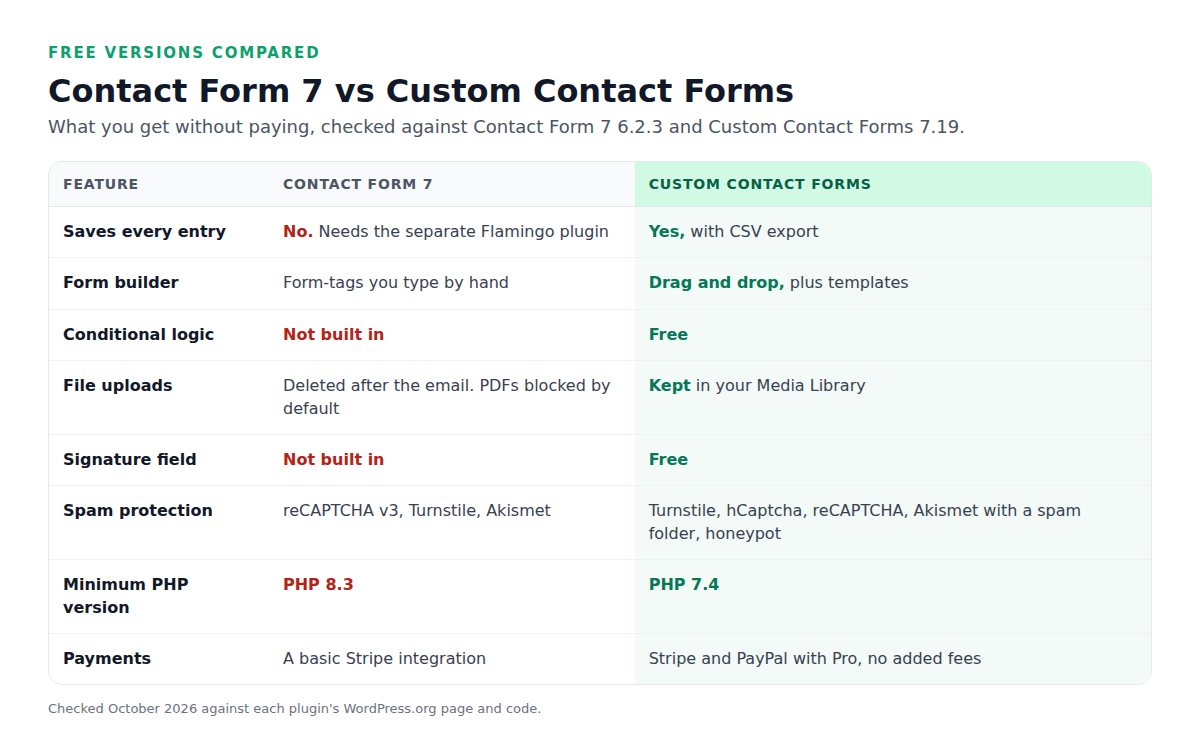
Both plugins are free on WordPress.org. The difference is how much you get without adding other plugins.
What Custom Contact Forms includes free
- Every entry saved in your dashboard, with CSV export.
- A drag-and-drop builder and ready-made templates.
- Conditional logic to show and hide fields and sections.
- File uploads saved to your Media Library and linked from each entry, with simple boxes for allowed file types and size.
- A signature field for agreements and waivers.
- Spam protection: a built-in honeypot, plus Cloudflare Turnstile, hCaptcha, reCAPTCHA and Akismet with a spam folder. Our spam protection guide compares them.
- Mailchimp signup forms and webhooks to Zapier, Make or n8n.
- Runs on PHP 7.4 and newer, including PHP 8.4.
When Contact Form 7 is still the better choice
Contact Form 7 isn’t a bad plugin, and switching isn’t right for everyone. Stay with it if:
- You like writing forms by hand and want full control over the form’s markup.
- You rely on a Contact Form 7 add-on that does something specific you can’t find elsewhere.
- Your forms are simple, the emails arrive reliably, and you’re already on PHP 8.3.
If you’re weighing several options, our list of the 8 best free WordPress contact form plugins compares Contact Form 7 with seven others.
How to switch from Contact Form 7
You don’t need to rebuild anything. Custom Contact Forms reads your Contact Form 7 forms and creates matching forms, without changing the originals.
Step 1: Install Custom Contact Forms
Go to Plugins → Add New, search for Custom Contact Forms, then install and activate it. You can keep Contact Form 7 active while you switch.
Step 2: Import your forms
Go to Forms → Import. Your Contact Form 7 forms are listed with a checkbox each. Tick the ones you want and click Import selected forms.
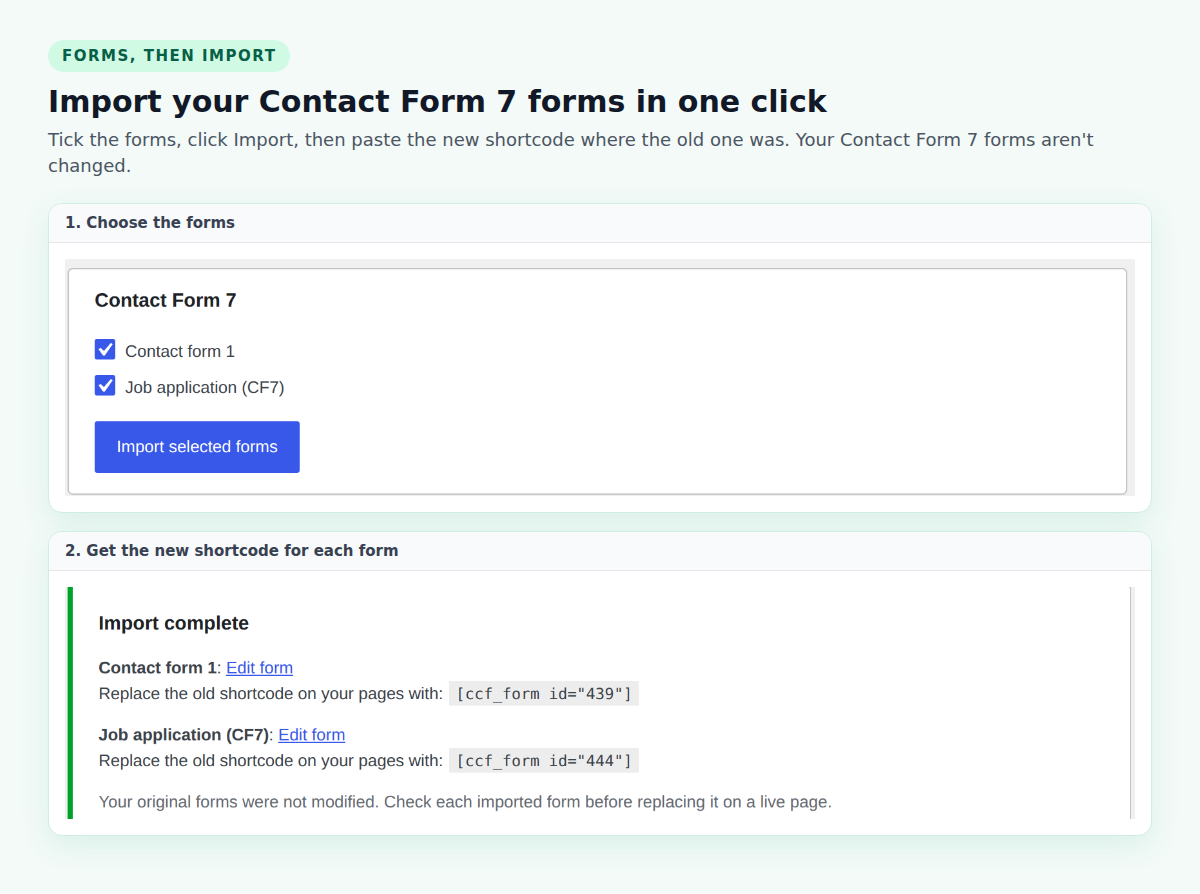
The import brings across your fields, labels, required settings, placeholders, the submit button text, acceptance checkboxes and the notification email from the Mail tab. Contact Form 7’s own quiz and image CAPTCHA don’t have an equivalent, so they’re skipped and listed in the results. Use Turnstile or reCAPTCHA instead. The import also works if you’ve already deactivated Contact Form 7.
Step 3: Check each form
Click Edit form next to each imported form and look it over in the builder. If a form has a file upload field, set its allowed file types and maximum size, since those settings live in Contact Form 7’s form-tags.
Step 4: Swap the shortcode on your pages
The import results show a new shortcode for each form, such as . Edit the page where the form appears and replace the old Contact Form 7 shortcode with the new one, or use the Contact Form (CCF) block instead.
Step 5: Send a test
Fill in each form yourself and check that the entry appears under Forms and the email arrives. Once everything works, you can deactivate Contact Form 7.
When you need more
If you also want to take payments, run surveys or build multi-step forms, Custom Contact Forms Pro adds Stripe and PayPal payments with no added fees, survey and rating fields, multi-step forms and PDF receipts, in the same plugin.
Frequently asked questions
What is the best alternative to Contact Form 7?
For most sites, a free plugin that saves every entry and has a drag-and-drop builder. Custom Contact Forms does both, includes conditional logic, file uploads and signatures free, and imports Contact Form 7 forms directly.
Can I import my Contact Form 7 forms?
Yes. Go to Forms → Import in Custom Contact Forms, tick your Contact Form 7 forms and click Import selected forms. Your original forms aren’t changed.
Will my old Contact Form 7 messages come across?
Contact Form 7 doesn’t save messages, so there’s nothing to bring across unless you used Flamingo. From the moment you switch, every new entry is saved in Custom Contact Forms.
Does Custom Contact Forms work on PHP 7.4?
Yes. It needs PHP 7.4 or newer and works on PHP 8.0 through 8.4, so it runs on hosts where the current Contact Form 7 won’t.
Can I keep Contact Form 7 installed while I switch?
Yes. Both plugins can run side by side, so you can move one form at a time and deactivate Contact Form 7 when you’re done.
Switch in a few minutes. Download Custom Contact Forms free from WordPress.org, import your Contact Form 7 forms, and start saving every entry.
Free on WordPress.org
Never lose another form entry
Custom Contact Forms saves every entry on your site and includes conditional logic, file uploads, a signature field, Mailchimp, webhooks and spam protection, all free.
Get our new form guides by email
Practical guides on forms, email delivery and spam, plus news when Custom Contact Forms gets new features.
We only use your email to send our guides and news. Unsubscribe anytime. Privacy Policy
