
You connected Stripe to WPForms Lite, took your first payments, and noticed a little less landing in your account than you expected. That’s the WPForms 3% fee. On every $100 payment, $3 goes to WPForms, on top of what Stripe already charges you for processing.
Three percent sounds small. Over a year of deposits, orders or registrations it adds up to real money. In this guide we’ll show you exactly who pays the fee, what it costs at different amounts, and the ways to stop paying it, including the option we make.
What is the WPForms 3% fee?
Since version 1.8.2, WPForms Lite lets you take payments without buying a license. In exchange, WPForms charges what it calls “Pay-as-you-go Pricing”: 3% of each payment, collected automatically through your payment account. You’ll see the notice under WPForms → Settings → Payments, once for each payment service.
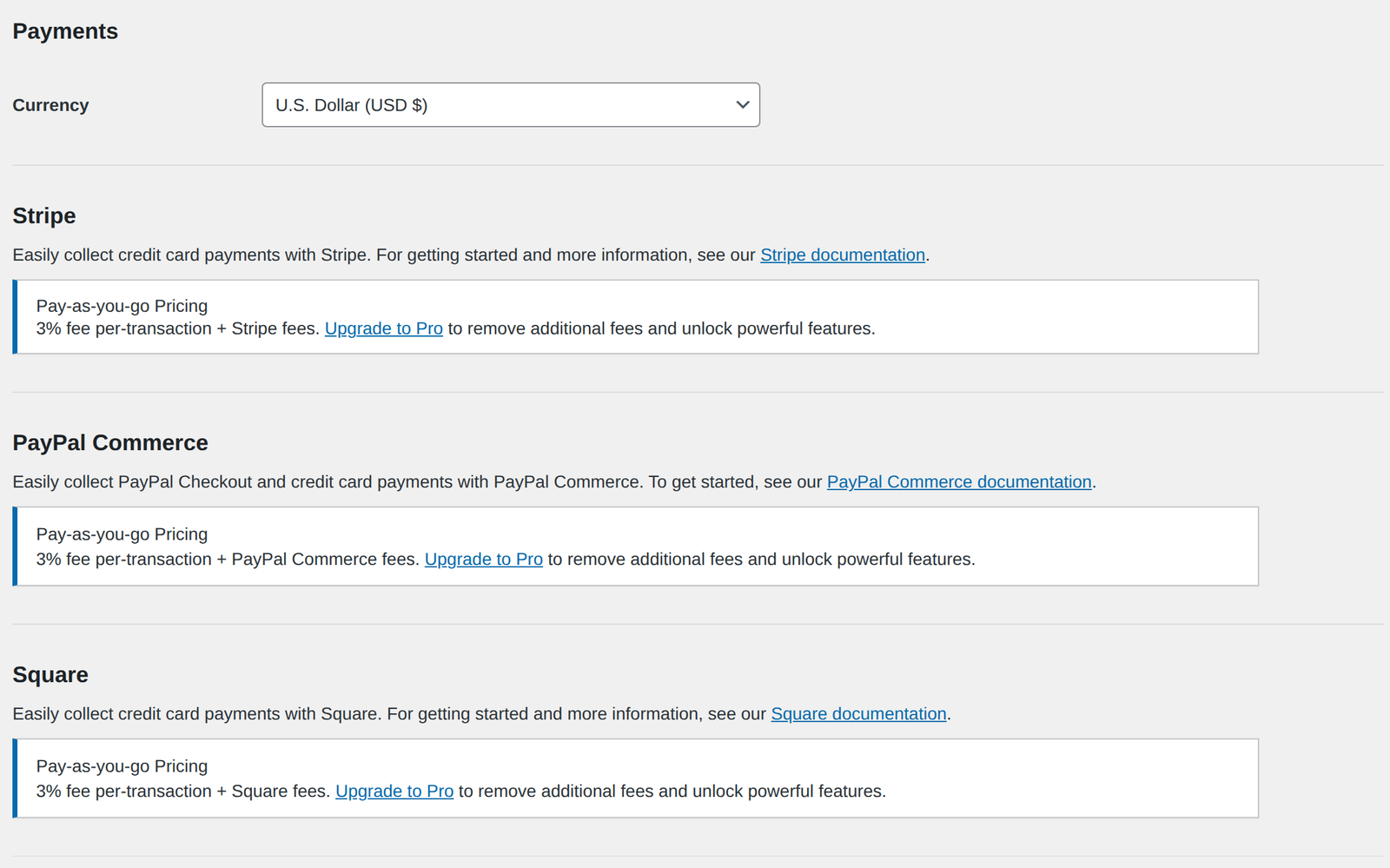
A few things worth knowing:
- It’s on top of processing fees. You still pay Stripe, PayPal or Square their normal rate. The 3% is extra.
- It applies to Stripe, PayPal Commerce and Square. Switching payment services inside WPForms Lite doesn’t avoid it.
- It applies to every payment for as long as the form is live, not just your first few.
Who pays the WPForms Stripe fee?
This is the part that surprises people. Buying a WPForms license doesn’t automatically remove the fee. According to WPForms’ own documentation, and the plugin’s code, the fee only goes away while the site has an active Pro license or higher.
| Your WPForms setup | 3% fee on payments? |
|---|---|
| WPForms Lite (free) | Yes |
| Basic license | Yes |
| Plus license | Yes |
| Pro, Elite or higher, active | No |
| Pro or higher, expired | Yes. WPForms asks you to renew to remove the fee again. |
One exception: the plugin doesn’t add the Stripe fee for Stripe accounts based in Brazil, India or Mexico.
What the 3% fee costs you in a year
Because the fee is a percentage, it grows with your sales. Here’s what 3% comes to over a year of form payments:
| Payments through your forms in a year | 3% WPForms fee | Custom Contact Forms Pro |
|---|---|---|
| $2,500 | $75 | $80 |
| $5,000 | $150 | $80 |
| $10,000 | $300 | $80 |
| $25,000 | $750 | $80 |
| $50,000 | $1,500 | $80 |
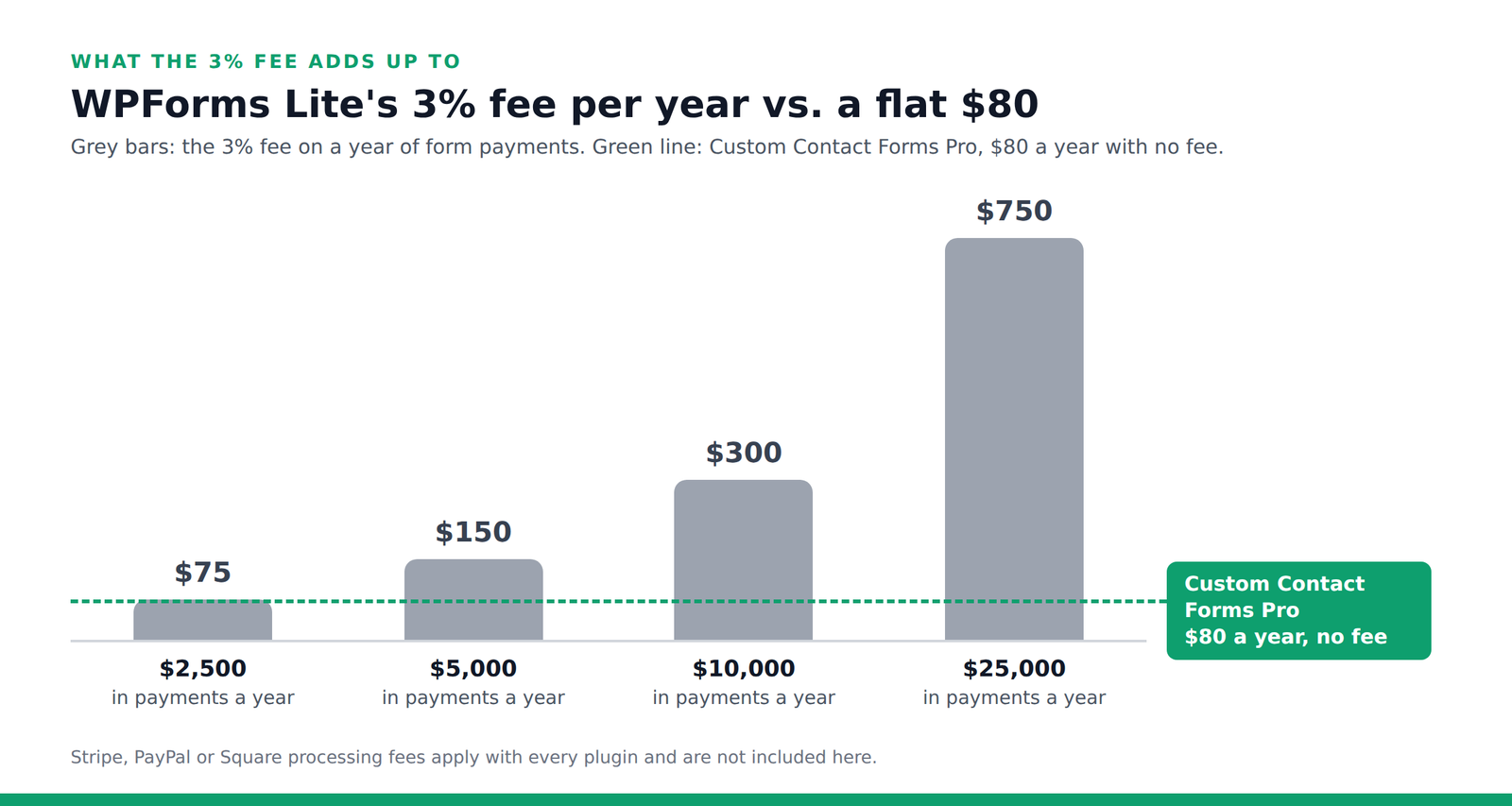
The break-even point is about $2,667 a year. If your forms take more than that, which is about $222 a month, the 3% fee costs you more than a full year of Custom Contact Forms Pro. Two $150 booking deposits a month already put you past it.
Keep the whole payment
Custom Contact Forms Pro takes Stripe and PayPal payments on your forms with no added transaction fees. $80 a year, every feature included, on unlimited sites you own.
How to remove the WPForms 3% fee
You have three realistic options. Each one makes sense for someone, so here’s an honest look at all three.
Option 1: Upgrade to WPForms Pro
WPForms Pro removes the fee while your license is active. WPForms lists Pro from $199.50 a year for 5 sites. That’s the first-year price, and independent price comparisons in 2026 list the Pro renewal at $399 a year.
It’s a good fit if you need recurring payments or subscriptions, or you use other WPForms Pro features and addons. If you mainly want to stop paying 3% on one-time payments, it’s the most expensive way to do it.
Option 2: Use a Stripe Payment Link instead of a form
If you just need people to pay a fixed amount, Stripe can create a payment link for you in its Dashboard, and you only pay Stripe’s normal fees. The catch is that a payment link isn’t a form on your site. The payment happens on Stripe’s page, separately from any details you collect on your site, so you’d match the two up yourself.
It’s a good fit if you take a handful of simple payments and don’t need anything else on the form.
Option 3: Switch to a form plugin with no added fee
This is the option we make, so we’ll be upfront about that. Custom Contact Forms Pro takes payments right on the form, through Stripe or PayPal, and adds no fee of its own. You pay your payment service’s normal rate and that’s it, however much you sell.
- Pay on the page with a card, Apple Pay, Google Pay or Link through Stripe, or with PayPal.
- Product, Total and Coupon fields, with fixed prices, dropdown options or an amount the customer chooses.
- Totals checked on your server, so nobody can change the price in their browser and pay less.
- PDF receipts attached to your notification emails, and every paid entry saved on your site.
- Ready-made payment templates for donations, product orders, event registrations, booking deposits, invoices and tips.
It’s a good fit if you take one-time payments such as deposits, orders, registrations, invoices or donations, and want a price that doesn’t grow with your sales.
WPForms Pro vs Custom Contact Forms Pro
| WPForms Pro | Custom Contact Forms Pro | |
|---|---|---|
| Price | From $199.50 first year | $80 a year |
| Sites | 5 | Unlimited sites you own |
| Added fee on payments | None while the license is active | None |
| Payment services | Stripe, PayPal, Square | Stripe, PayPal |
| Recurring payments | Yes | No, one-time payments only |
| Entries saved on your site | Yes | Yes, in the free plugin too |
If you need subscriptions, WPForms Pro is the better choice and we’d rather tell you that now. For everything else, Custom Contact Forms Pro does the job for less than half the first-year price.
How to move a WPForms payment form to Custom Contact Forms
Step 1: Install Custom Contact Forms and Pro
Install the free Custom Contact Forms plugin from WordPress.org, then add Custom Contact Forms Pro on top of it. You can keep WPForms active while you set things up.
Step 2: Import your form
Go to Forms → Import and choose your WPForms forms. Your fields, choices and thank-you message come across. Payment fields aren’t converted, and the import report lists them, so you’ll add those in the next step. If you’d rather start fresh, pick a payment template under Forms → Templates instead.
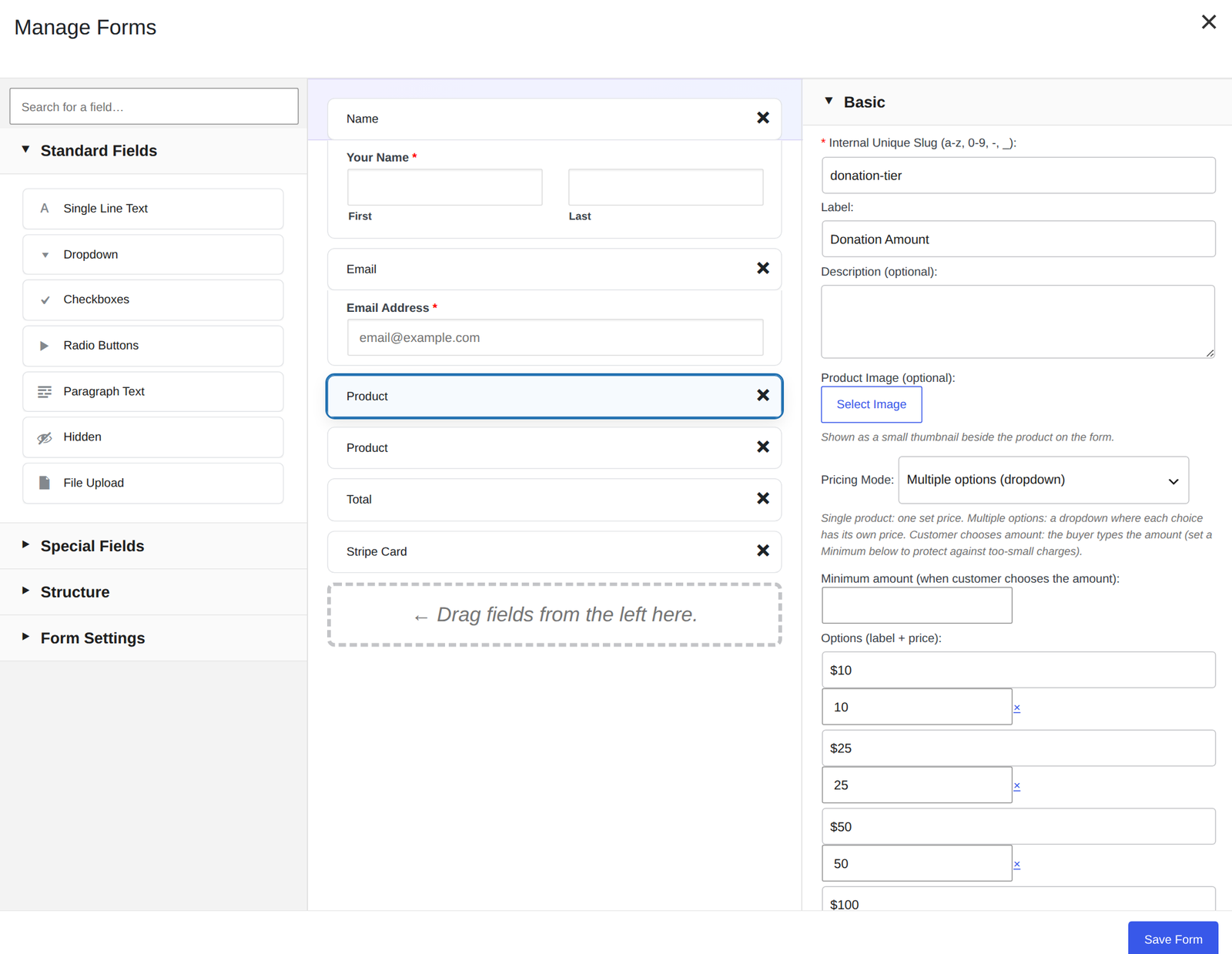
Step 3: Add your payment fields
Add a Product field for what you’re charging, a Total field, and a Stripe Card or PayPal field where the payment happens. Click the Product field to set the price.
Step 4: Connect Stripe or PayPal and test
Go to Forms → Integrations, open Stripe Payments or PayPal, and add your keys in test mode. Make a test payment with Stripe’s test card 4242 4242 4242 4242, then switch to live mode. Our guide to payment forms without WooCommerce covers each setting in detail.
Step 5: Swap the form on your page
Replace the WPForms block or shortcode on your page with the Custom Contact Forms block. Once a live payment goes through, you can deactivate WPForms. Your past WPForms payments stay in your Stripe or PayPal account.
Frequently asked questions
Is the WPForms 3% fee on top of Stripe’s fees?
Yes. WPForms’ notice reads “3% fee per-transaction + Stripe fees.” Stripe’s processing fee applies whatever form plugin you use, and the 3% is added on top.
Does WPForms Basic or Plus remove the 3% fee?
No. WPForms says Lite, Basic and Plus all add the 3% fee. You need an active Pro license or higher.
What happens if my WPForms Pro license expires?
The fee comes back. WPForms only skips the fee while the license is active, and its settings screen asks you to renew to remove the fee again.
Can I avoid the fee by using PayPal or Square in WPForms Lite?
No. WPForms Lite shows the same 3% fee for Stripe, PayPal Commerce and Square.
Does Custom Contact Forms charge a transaction fee?
No. Custom Contact Forms Pro is $80 a year with no added transaction fees. You only pay Stripe’s or PayPal’s own processing fees.
Can Custom Contact Forms take recurring payments?
No. Custom Contact Forms Pro takes one-time payments. If you need subscriptions, WPForms Pro or a dedicated billing tool is the better fit.
Can I try it before I pay?
The free Custom Contact Forms plugin is on WordPress.org, so you can import your WPForms forms and try the builder first. See how it compares in our free WPForms Lite alternative guide. Pro adds the payment fields on top. If Pro doesn’t work for you and we can’t fix it, you can get a refund within 14 days. See our refund policy for details.
Stop giving away 3% of every payment. Get Custom Contact Forms Pro, import your WPForms form, and take your next payment with no added fee. $80 a year, unlimited sites you own.
Custom Contact Forms Pro
Take payments right on your forms
Pro adds Stripe and PayPal payments, PDF receipts, coupons and multi-step forms to the plugin you already use. No store, no cart, no extra plugins.
Get our new form guides by email
Practical guides on forms, email delivery and spam, plus news when Custom Contact Forms gets new features.
We only use your email to send our guides and news. Unsubscribe anytime. Privacy Policy