
Updated October 2026 for Custom Contact Forms 7.18 and Pro 1.5.
Most people reading this should stay on the free plugin.
That’s not modesty. The free version of Custom Contact Forms is a complete form builder. If you’re collecting names, emails, messages, file uploads or even signatures, and sending new contacts to Mailchimp or Zapier, Pro adds nothing you need. This page exists so you can tell quickly which side of that line you’re on.
The one-sentence version
Free builds forms and connects them to your tools. Pro turns those forms into transactions: payments, signed PDF records and multi-step flows.
If money is involved, or you need a lasting record of exactly what someone agreed to, you need Pro. If not, you don’t.
What’s in the free plugin
Everything here is on WordPress.org at no cost, with no submission limits.
Building
- Drag-and-drop builder with live preview
- Prebuilt templates: contact, quote request, newsletter, event registration, feedback
- Text, paragraph, email with optional confirmation, name, phone, website, address (US and international), date/time, dropdowns, checkboxes, radio buttons, file uploads, signatures, hidden fields, HTML blocks
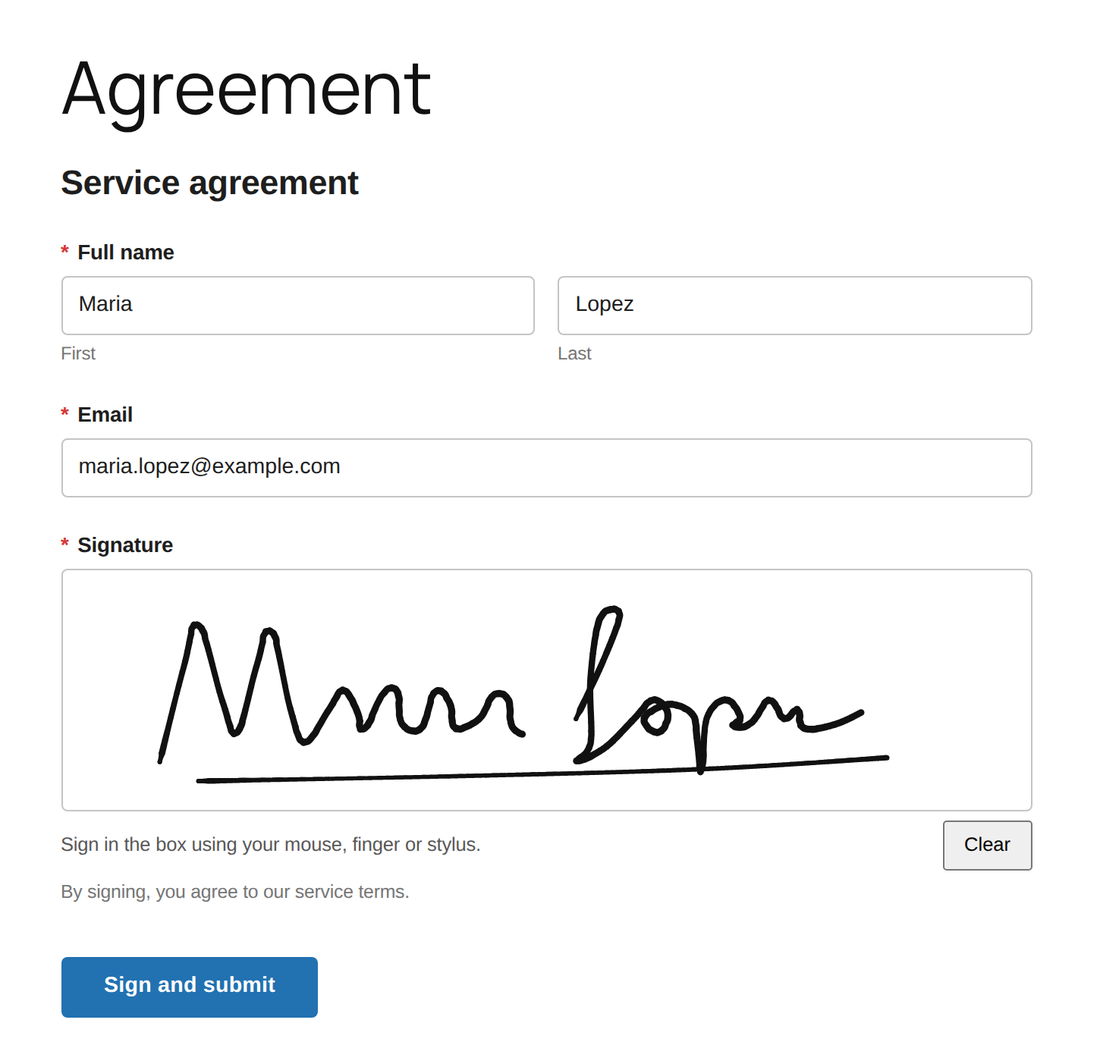
- Signature field: visitors sign with a mouse, finger or stylus, and the signature is saved with the entry and included in the notification email
- Conditional fields and sections that show or hide based on other answers
- Form themes, per-field width controls for multi-column layouts, custom CSS
- Build a form by describing it, using the AI provider already connected to your site (WordPress 7.0 or later)
- Import your forms from Contact Form 7 and WPForms
Integrations
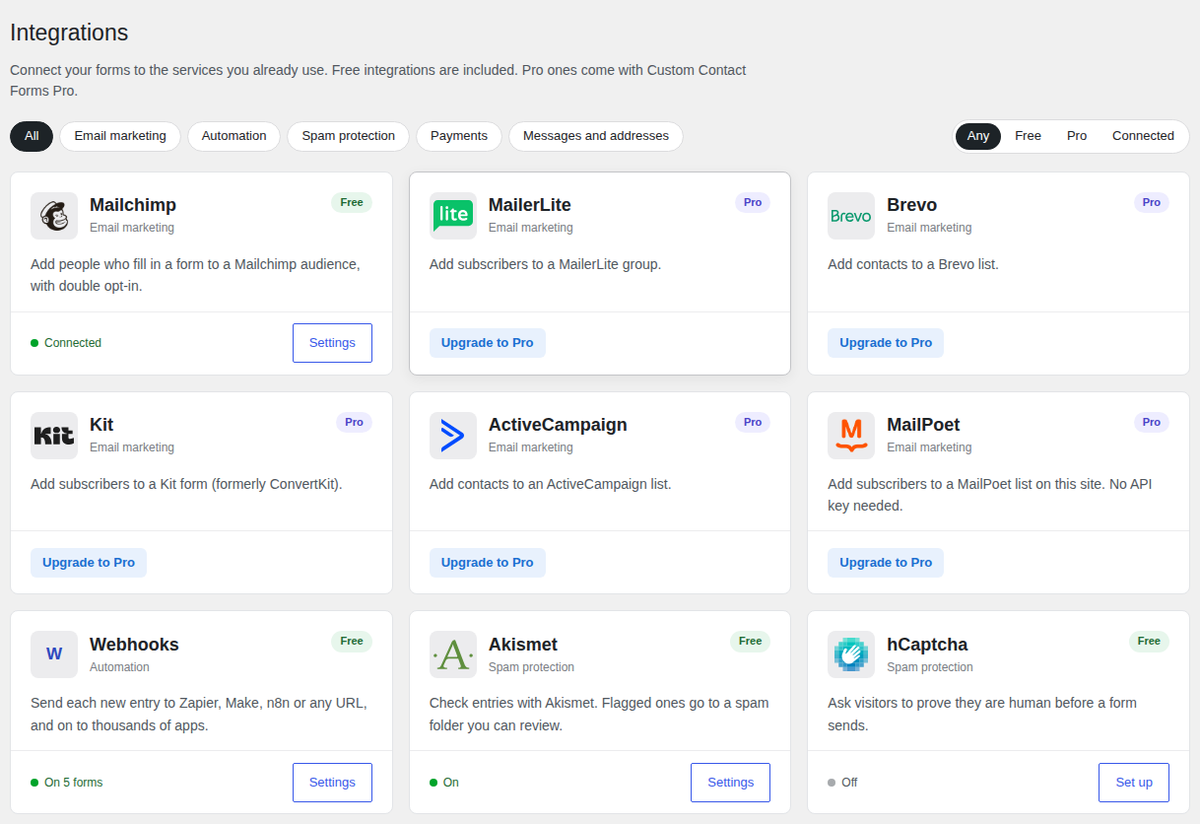
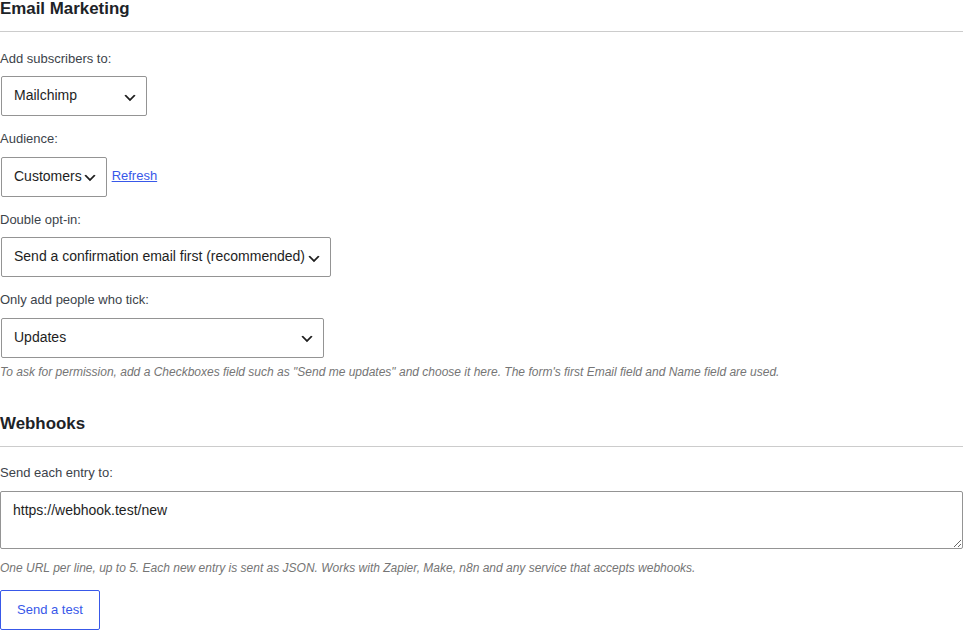
- Mailchimp: add people who fill in a form to an audience you choose per form, with double opt-in and an optional consent checkbox
- Webhooks: send each new entry to Zapier, Make, n8n or any URL, with a “Send a test” button
- One Integrations page showing what’s connected, plus a list of recent problems so you can see why a subscriber or webhook didn’t go through
Publishing
- Gutenberg block, shortcode, widget and PHP template tag
- AJAX submission with no page reload
- Conditional asset loading: scripts only load on pages that have a form
Handling submissions
- Every submission stored in WordPress, with CSV export and CSV import with automatic column mapping
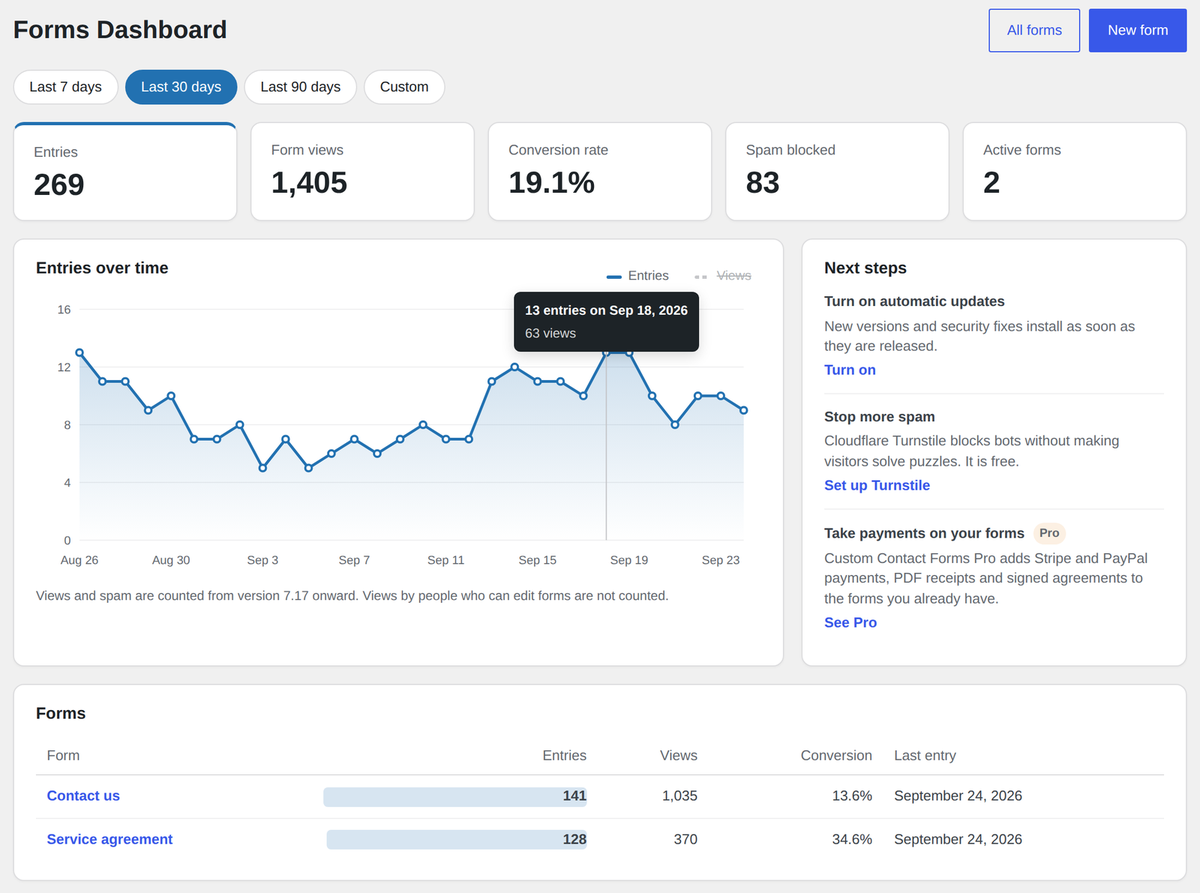
- A Forms dashboard with entries, form views, conversion rate and blocked spam for any date range
- A weekly summary email with the past week’s numbers (easy to turn off)
- Form import and export via WordPress XML
- Multiple email notifications per form, with custom recipients, subject, from name, reply-to and field mapping
- Email diagnostics: send test emails and view delivery failure logs
- Post creation on submission, mapping fields to post fields, meta and taxonomies
Spam and access
- Cloudflare Turnstile, hCaptcha, reCAPTCHA and simple captcha
- Akismet checks with a spam folder, so a real message caught by mistake is never lost
- Honeypot, time-based trap, IP rate limiting, disposable email blocking, keyword blacklist
- Restrict forms to logged-in users, or pause a form with a custom message
For developers
- Hooks, filters and custom field types
- A REST endpoint that runs the full pipeline (validation, anti-spam, storage, notifications) against your own frontend
What Pro adds
Pro installs on top of the free plugin. Same builder, same forms, extra fields in the palette and extra cards on the Integrations page. Nothing you’ve already built changes.
Taking payments
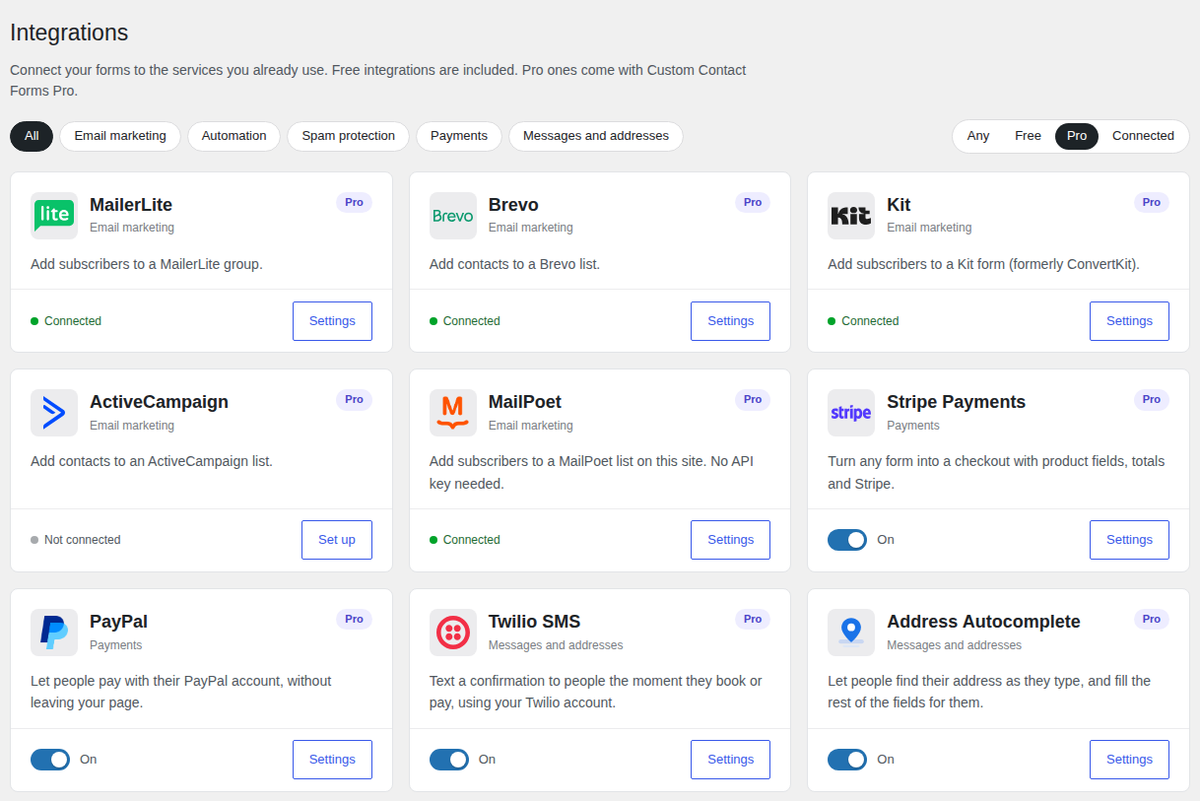
- Stripe payments directly on the form: cards, Apple Pay, Google Pay and Link, all completing on the page
- PayPal payments, approved in a PayPal window without leaving your page
- Product fields with three pricing modes: one fixed price, a dropdown where each option carries its own price, or customer-chooses-amount
- Quantities, minimum and maximum quantities, enforced minimum amounts, product images and descriptions
- A live Total field and coupon codes, percentage or fixed
- Server-verified totals: the amount charged is recalculated on your server, never taken from the browser
Agreements
- Signatures rendered as real ink in PDF receipts and submission PDFs
- Consent field with versioned terms: the exact text someone agreed to is snapshotted permanently, so editing your terms next month doesn’t rewrite what past customers accepted
Longer forms
- Multi-step forms with page breaks, a progress indicator and per-step validation
- Conditional pricing: show or hide products and priced fields based on answers, and a hidden priced field is never charged
- Survey fields (Likert grids), star ratings and sliders
More integrations
- Email marketing with MailerLite, Brevo, Kit, ActiveCampaign and MailPoet, alongside the free Mailchimp connection
- Address autocomplete: visitors pick their address as they type and the street, city, state and ZIP fill themselves in (uses your own Google API key)
- SMS confirmations: text customers the moment they book or pay, through your own Twilio account
Output
- PDF receipts attached to notification emails for paid orders
- One-click PDF download of any submission
- Paid submissions flagged in the submissions table with the Stripe payment reference stored for lookup
Templates
- 13 additional ready-made templates: Donation Form, Product Order Form, Paid Event Registration, Service Booking Deposit, Invoice Payment, Tip Jar, Course Signup, Fundraiser with Fee Cover, Liability Waiver, Photo / Media Release, Service Agreement + Deposit, Rental Agreement, and Customer Satisfaction Survey Pro
Side by side
| Free | Pro | |
|---|---|---|
| Drag-and-drop builder | ✓ | ✓ |
| Standard fields, file uploads | ✓ | ✓ |
| Signature field | ✓ | ✓ |
| Form templates | 5 | 18 |
| Conditional fields and sections | ✓ | ✓ |
| Forms dashboard and weekly summary | ✓ | ✓ |
| Mailchimp | ✓ | ✓ |
| Webhooks (Zapier, Make, n8n) | ✓ | ✓ |
| Turnstile, hCaptcha, reCAPTCHA | ✓ | ✓ |
| Akismet with a spam folder | ✓ | ✓ |
| CSV import and export | ✓ | ✓ |
| Email notifications and diagnostics | ✓ | ✓ |
| REST endpoint for custom frontends | ✓ | ✓ |
| Stripe payments on the form | No | ✓ |
| PayPal payments on the form | No | ✓ |
| Product, Total and Coupon fields | No | ✓ |
| Conditional pricing | No | ✓ |
| Signatures in PDFs | No | ✓ |
| Versioned consent records | No | ✓ |
| Multi-step forms | No | ✓ |
| Survey and rating fields | No | ✓ |
| PDF receipts and exports | No | ✓ |
| MailerLite, Brevo, Kit, ActiveCampaign, MailPoet | No | ✓ |
| Address autocomplete | No | ✓ |
| SMS confirmations (Twilio) | No | ✓ |
| Added transaction fees | None | None |
| Price | Free | $80/year |
Stay on free if…
- Your form collects information and sends it to you
- You want new contacts added to Mailchimp, or entries sent to Zapier or Make
- You need a signature on the entry, but not a PDF of it
- You need spam protection, file uploads or multiple notification recipients
- You want conditional fields that show and hide based on answers
- You’re building against the REST endpoint with your own frontend
- You’re on a client site that doesn’t handle money
The free plugin isn’t a trial. It doesn’t expire, it isn’t limited by submission count, and it keeps getting updates.
You need Pro if…
- Someone has to pay on the form. A deposit, a registration fee, a donation, an invoice, a single service. By card, Apple Pay, Google Pay or PayPal.
- You need a signed document, not just a signature. A waiver, a release or a service agreement, with the signature in a PDF you can keep and send.
- You need to prove what they agreed to. A checkbox records that someone agreed. Versioned consent records what they agreed to, and keeps that text unchanged after you update your terms.
- The form is too long for one screen. Splitting it into steps with a progress bar makes a long form feel manageable.
- Your email list lives somewhere other than Mailchimp. MailerLite, Brevo, Kit, ActiveCampaign or MailPoet.
- You want fewer address typos or instant text confirmations. Address autocomplete and Twilio SMS.
- You’re running a survey, not a contact form.
What it costs
$80 per year. One plan, every feature, unlimited sites you own. No tiers, no per-feature add-ons.
Pro adds no transaction fees. You pay Stripe’s or PayPal’s standard processing rate and nothing on top. That matters more than it sounds: some form plugins take a percentage of every payment on their cheaper tiers, which means your plugin bill grows with your revenue.
Common questions
Do I need the free plugin installed to use Pro? Yes. Pro is an add-on, not a replacement. Install the free plugin from WordPress.org first, then upload Pro.
Will my existing forms break? No. Pro adds fields to the builder. Forms you’ve already built keep working exactly as they are.
I used the signature field or Mailchimp in Pro before. Do I lose anything? No. Both moved into the free plugin, and your existing signature fields, saved signatures and Mailchimp settings carry over automatically. Signatures still appear in Pro’s PDF receipts.
How many sites can I use it on? Unlimited sites that you own.
Can I try it before buying? Build your form on the free plugin first. It’s the same builder, so when you add Pro your form is already there waiting. There’s also a 14-day refund policy; see the refund page for conditions.
Do payments work with Elementor, Divi or Bricks? Yes. Embed with the shortcode or block as usual; the payment flow is self-contained.
What payment methods are supported? With Stripe: cards, Apple Pay, Google Pay and Link. With PayPal: PayPal checkout in a popup window. Redirect-based and delayed methods like bank debits and buy-now-pay-later aren’t offered through Stripe, because they can’t complete safely inside an on-page form.
Download the free plugin: full builder, no limits, no trial period. Or see Pro pricing.
Free on WordPress.org
Never lose another form entry
Custom Contact Forms saves every entry on your site and includes conditional logic, file uploads, a signature field, Mailchimp, webhooks and spam protection, all free.
Get our new form guides by email
Practical guides on forms, email delivery and spam, plus news when Custom Contact Forms gets new features.
We only use your email to send our guides and news. Unsubscribe anytime. Privacy Policy