
Building a form has always been the same set of small chores. Add a field. Pick the type. Name it. Decide if it is required. Add another. Reorder them when you realise the email should come before the phone number. None of it is hard, and all of it is slow.
Version 7.16 of Custom Contact Forms, the free plugin, adds a different way in. It puts a WordPress AI form generator directly in the builder. You write a sentence describing the form you need, and the plugin builds it.
How the WordPress AI form generator works
Open the form builder and you will find a new option to generate a form from a description. Type something like “a quote request form for a plumbing business” and you get back a working form with the fields that kind of business actually needs, each set to the right type.
The examples below came from testing during development, not from a mockup.
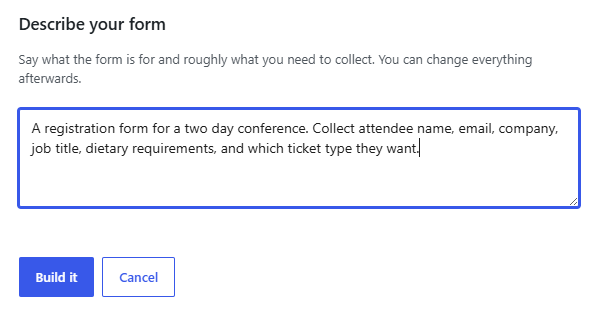
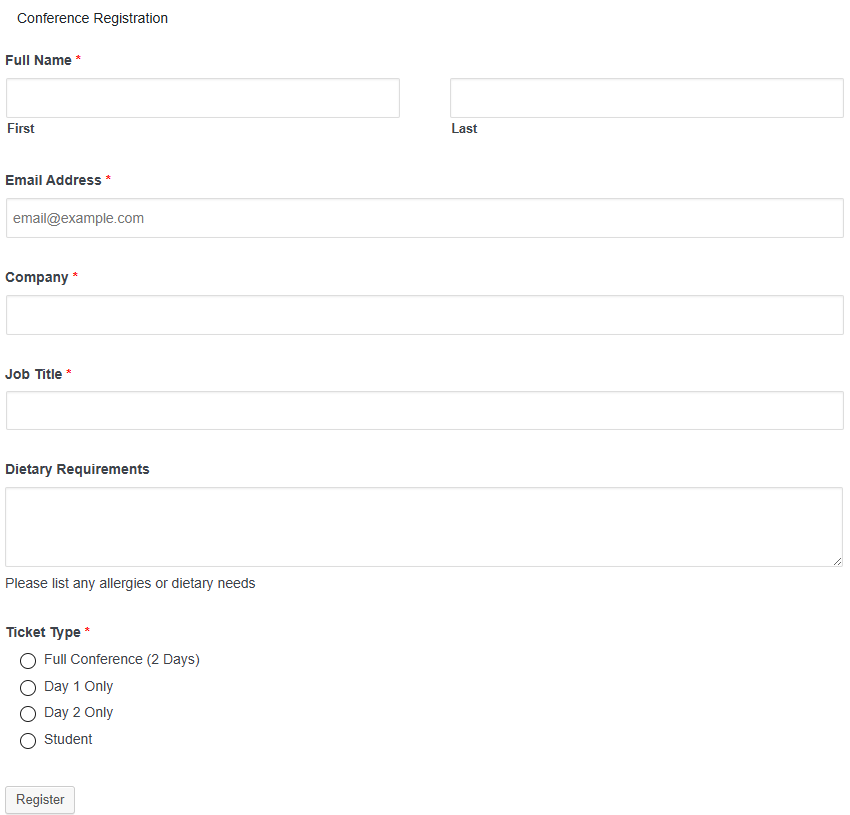
A four field plumbing quote form came back with name, email, phone, and a description of the problem. A conference registration request produced exactly the six fields asked for, with a split first and last name input, a radio group of ticket options that were never specified, and a help line under dietary requirements that nobody asked for. Nothing invented, nothing padded out to look impressive.
You can then edit everything. The generated form is a normal Custom Contact Forms form from the moment it is created. Rename fields, delete what you do not want, add what is missing, change the notification settings. There is no separate AI mode to stay inside.
The part that matters most
Custom Contact Forms does not ask you for an API key, and it does not store one.
WordPress 7.0 introduced a built-in AI client, with providers configured centrally under Settings and Connectors. Custom Contact Forms uses that. Whichever provider you have already connected to your site is the one that generates your forms. Your key stays where WordPress keeps it, managed by WordPress, shared across every plugin that uses the same client rather than copied into each one.
That has a practical consequence worth stating plainly. If you switch providers later, nothing in Custom Contact Forms needs to change. If you remove a provider, form generation disappears cleanly and the rest of the plugin carries on as normal.
It also means there is a requirement. You need WordPress 7.0 or later, and you need a provider connected. On WordPress 6.x, or with no provider set up, the feature is hidden entirely rather than sitting there greyed out. A panel in settings tells you exactly which of the two is missing.
Where Pro comes in
Something interesting happens when you describe a form that needs more than fields.
Ask for a booking form that takes a deposit, or a contract request with a signature at the bottom, and the generator builds what it can while telling you which parts need Custom Contact Forms Pro. It does not quietly drop them and hand you an incomplete form.
Those parts are real features, not placeholders:
Payments. Stripe and PayPal, taken inline on the form itself, with the payment recorded against the submission so you can see at a glance what was paid and what was not. Your own Stripe or PayPal account, your own money, no platform sitting in the middle taking a percentage.
PDF receipts. Generated on submission and attached to the confirmation email, so the person who just paid you has something in their inbox that looks like a receipt.
Multi-step forms. Long forms broken into stages, which is the difference between a form people finish and a form people abandon halfway down.
Digital signatures. A signature field that captures a real drawn signature, saved with the submission.
If you are generating forms that collect money or agreements, that is the line where Pro starts paying for itself.
Learn more about Custom Contact Forms Pro
Try it
Update to 7.16 from your plugins screen, or install Custom Contact Forms from the WordPress plugin directory. If you are running WordPress 7.0 with a provider connected, generation is available immediately.
A suggestion from testing: be specific in your description. “Contact form” gets you a contact form. “A contact form for a veterinary clinic that asks about the pet as well as the owner” gets you something you would otherwise have spent ten minutes assembling by hand.
The feature is free, it is in the free plugin, and it is not limited by number of forms.
Free on WordPress.org
Never lose another form entry
Custom Contact Forms saves every entry on your site and includes conditional logic, file uploads, a signature field, Mailchimp, webhooks and spam protection, all free.
Get our new form guides by email
Practical guides on forms, email delivery and spam, plus news when Custom Contact Forms gets new features.
We only use your email to send our guides and news. Unsubscribe anytime. Privacy Policy